What Is Vector Search? How AI Finds Relevant Information in Millions of Records
Introduction: How Can AI Find the Right Information?
Imagine you're building an AI assistant for your company's technical documentation.
A developer asks:
"Why is my API responding slowly?"
Your documentation contains these articles:
-
Diagnosing high API latency.
-
Optimizing slow database queries.
-
Reducing HTTP response times.
-
Investigating memory and CPU bottlenecks.
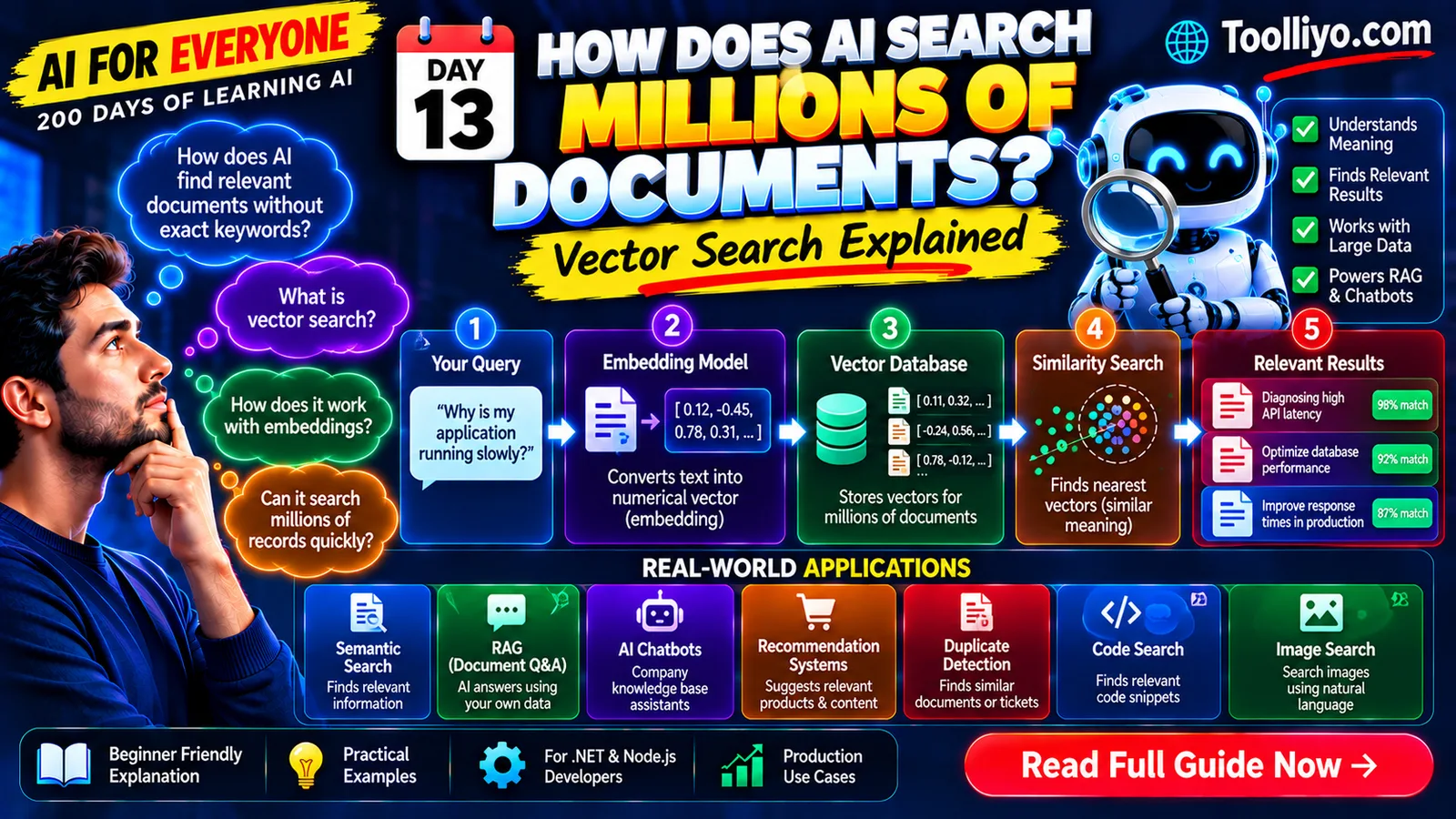
The question and the document titles use different words, but several articles could be relevant.
A traditional keyword search can find exact matches and related terms. However, keyword matching alone may miss useful content when the wording differs.
Vector search offers another approach: represent information as numerical vectors and retrieve items based on their mathematical similarity.
Vector search is widely used in semantic search, document retrieval, recommendation systems, and Retrieval-Augmented Generation (RAG).
In this guide, you'll learn how vector search works, what vector databases do, how it differs from traditional search, and how developers can use it in real applications.
1. What Is Vector Search?
Vector search is a search technique that finds candidate items by comparing their numerical vector representations.
Those vectors may represent text, images, audio, products, or other data, depending on the embedding model and search system.
For language applications, an embedding model converts text into a vector. A search system then compares a query vector with stored document vectors to find relevant candidates.
For example:
User query: "How do I recover my account?"
Stored content:
-
Reset your password.
-
Recover access to your profile.
-
Update your account email.
-
View the company holiday calendar.
A vector-search system may rank the first two documents highly because their representations are relevant to the query.
The search is not based exclusively on exact word matches.
However, vector similarity is not a guarantee of relevance or correctness. Results depend on the model, data, retrieval method, and application design.
2. What Is a Vector?
A vector is an ordered collection of numbers.
For example:
[0.12, -0.45, 0.78, 0.31]
This is a simple illustrative vector with four dimensions.
An embedding model may generate vectors containing hundreds or thousands of dimensions, depending on the model.
In AI applications, vectors provide a mathematical representation that can be compared using operations such as dot product, cosine similarity, or Euclidean distance.
You don't need to understand every mathematical detail to start building a vector-search application. But you should understand the relationship between embeddings and search:
-
An embedding model produces a vector.
-
A search index stores or organizes vectors.
-
A query is represented as a vector.
-
The search system ranks candidate vectors.
-
The application retrieves the associated content.
This is the foundation of many semantic search systems.
3. How Does Vector Search Work?
Let's use a company knowledge base as an example.
Step 1: Collect your data
Your application may contain PDFs, Word documents, technical articles, support tickets, or internal knowledge-base pages.
First, extract the useful text and associated metadata.
Metadata might include a document identifier, department, creation date, or access-control information.
Step 2: Split documents into chunks
Long documents are often divided into smaller, meaningful sections.
For example, an API troubleshooting guide might contain separate sections about:
-
Slow database queries.
-
High CPU usage.
-
Network latency.
-
Memory pressure.
-
HTTP timeouts.
Chunking makes it easier to retrieve a specific passage instead of an entire document.
There is no universally ideal chunk size. The best strategy depends on document structure, query types, model limits, and evaluation results.
Step 3: Generate embeddings
An embedding model converts each chunk into a numerical vector.
The application stores the vector alongside the original text or a reference to it.
The vector represents learned patterns in the input. It is not a compressed, guaranteed-to-be-complete copy of the original document.
Step 4: Store the vectors
Store the vectors in a vector database or vector-search index.
Depending on the technology, the system may build an index to accelerate searches over a large collection.
Step 5: Process the user's query
When a user submits a question, the application generates an embedding for that query using a compatible embedding model.
The query and stored vectors need compatible representations for meaningful comparisons.
Step 6: Search for similar vectors
The search system compares the query vector with candidate vectors using the configured similarity or distance method.
It returns a ranked list of candidate results.
Step 7: Retrieve the original content
Your application uses the returned identifiers to fetch the corresponding document chunks.
It should apply authorization and metadata filters before exposing any content to the user.
Step 8: Use the results
The application can show the retrieved documents directly or pass the relevant passages to an LLM.
In a RAG application, the LLM uses the retrieved information as context when generating its response.
The complete workflow is:
Documents → Chunks → Embeddings → Vector index → Query embedding → Similarity search → Retrieved content
4. What Is a Vector Database?
A vector database or vector-search system stores and retrieves vectors efficiently.
Depending on the product, it may also support metadata filtering, indexing, hybrid search, access-control integration, and operational monitoring.
Examples include:
-
PostgreSQL with pgvector: Adds vector storage and similarity-search capabilities to PostgreSQL.
-
Azure AI Search: Supports vector and hybrid search in managed search solutions.
-
Pinecone: A managed vector database service.
-
Qdrant: A vector-search engine with filtering capabilities.
-
Weaviate: A vector database supporting vector and hybrid search.
-
Milvus: A vector database designed for similarity search across large collections.
These products are not identical. Their capabilities, deployment options, pricing, operational requirements, and integrations differ.
Choose based on your data volume, expected query load, security needs, existing infrastructure, and retrieval requirements.
What does a vector database store?
A typical record may include:
-
Document or chunk ID.
-
Embedding vector.
-
Original text or a reference to it.
-
Metadata such as document category.
-
Access-control information or references to permissions.
For example, a vector record might represent a paragraph explaining how to troubleshoot an ASP.NET Core AP
