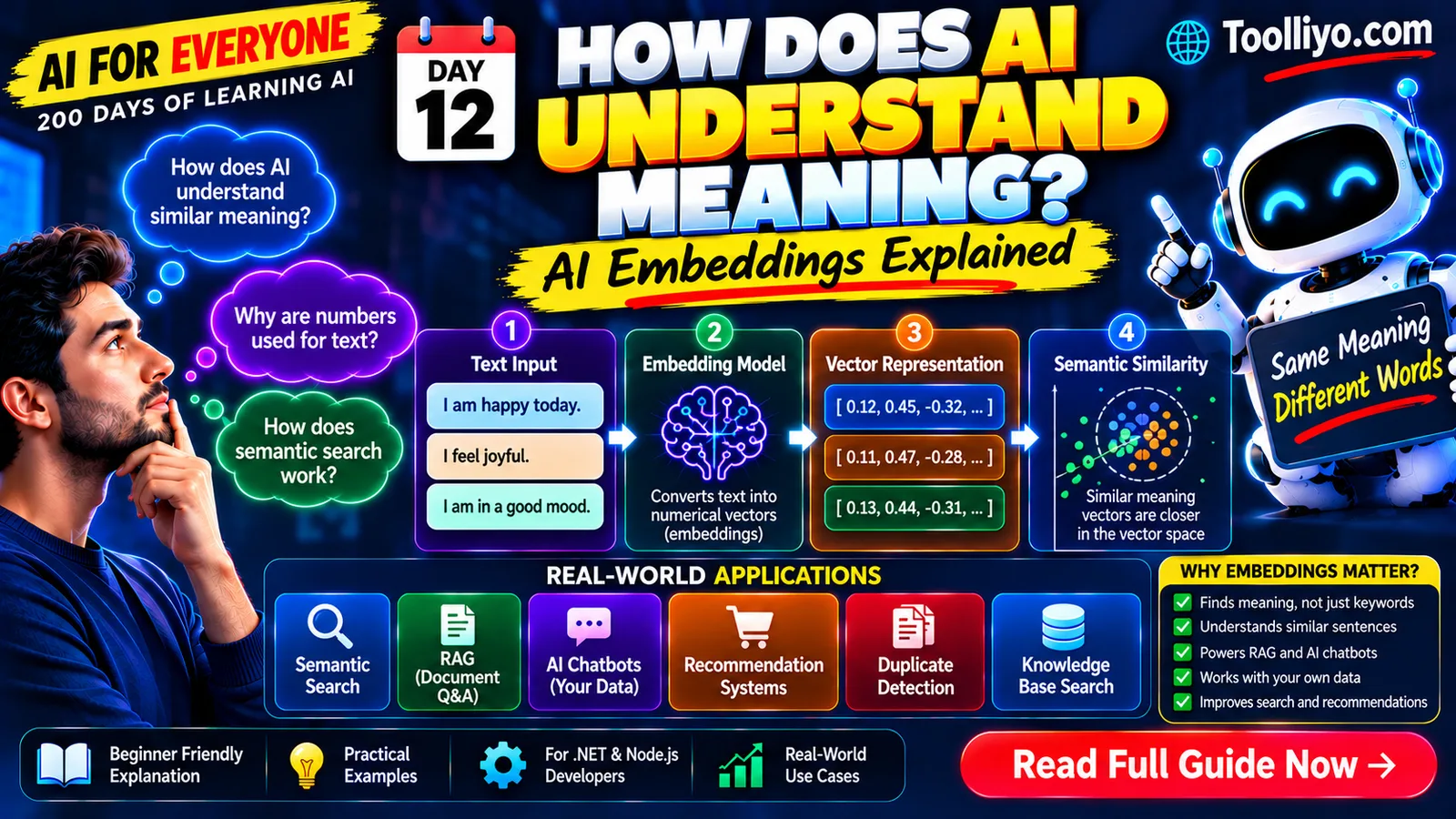
What Are AI Embeddings? How AI Converts Meaning Into Numbers
Introduction: How Can AI Recognize Similar Meanings?
Imagine searching your company's knowledge base for:
"How can I take time off?"
Your HR policy contains this sentence:
"Employees can submit annual leave requests through the HR portal."
The words are different, but the two sentences are related.
Traditional keyword search may struggle to find that connection if the search terms don't overlap sufficiently. A semantic search system can use AI embeddings to identify potentially relevant content based on learned representations of meaning.
This is one of the reasons embeddings are important in modern AI applications.
They help power semantic search, document retrieval, recommendation systems, duplicate detection, and Retrieval-Augmented Generation (RAG).
In this guide, you'll learn what embeddings are, how they work, how similarity is measured, and how developers can use them in real applications.
1. What Are AI Embeddings?
An embedding is a numerical representation of data produced by a model.
The input could be text, an image, audio, or another supported type of information.
For text embeddings, an embedding model converts a piece of text into a vector—a sequence of numerical values.
A simplified example:
Input:
"How do I reset my password?"
Illustrative embedding:
[0.12, -0.34, 0.81, 0.27, ...]
These numbers are illustrative, not actual output from a specific embedding model.
The resulting vector represents patterns learned by the model. A system can compare that vector with other vectors to identify related content.
Embeddings are not ordinary dictionary definitions, and each individual number does not generally correspond to a simple human-readable meaning.
Instead, the vector works as a mathematical representation that supports comparisons and other machine-learning operations.
2. Why Does AI Need Embeddings?
Computers can compare text using exact matches, keyword overlap, or string similarity.
For example, a keyword search for "car" might find a document containing "car" but miss another document that discusses "automobiles."
Embeddings offer a different approach.
A suitable embedding model may represent "car" and "automobile" as semantically related because it has learned useful patterns from training data.
Consider these examples:
-
"How do I cancel my subscription?"
-
"I want to end my membership."
-
"What is the capital of France?"
The first two sentences express related intentions, even though their wording differs. The third expresses a different intent.
A semantic search system can compare their embeddings to help identify the most relevant result.
Important: Embeddings do not guarantee that every synonym, paraphrase, or subtle distinction will be represented correctly. Model quality and the nature of the text matter.
3. How Do Embeddings Work?
Let's break the process into simple steps.
Step 1: Provide the input
You supply a piece of text to an embedding model.
Example:
"Employees can request annual leave online."
Step 2: The model processes the text
The model applies its learned transformations to the input.
The exact architecture and processing details depend on the embedding model.
Step 3: Generate a vector
The model produces a list of numbers representing the input.
For example:
[0.18, 0.42, -0.09, 0.73, ...]
The vector's dimensions depend on the model. Different models can produce vectors of different sizes.
Step 4: Store or compare the vector
Your application may store the vector alongside the original text and its metadata.
When a user searches, your application can generate an embedding for the query and compare it with stored vectors.
Step 5: Retrieve relevant content
The system ranks candidate vectors using a similarity or distance measure and retrieves the most relevant records according to the application's retrieval strategy.
For document question-answering, the retrieved text can then be provided to an LLM as context.
The complete workflow is:
Text → Embedding model → Numerical vector → Similarity search → Relevant results
This is a simplified representation. Production systems may also use metadata filters, keyword search, reranking, and access-control checks.
4. What Is a Vector in AI?
A vector is an ordered collection of numerical values.
For example, a simple three-dimensional vector can be written as:
[0.2, 0.7, -0.4]
This vector has three dimensions.
A text embedding might contain hundreds or thousands of dimensions, depending on the model.
You can think of a vector as a point in a mathematical space. Comparing two vectors helps a system estimate how closely their representations relate according to a chosen mathematical measure.
However, text embeddings usually exist in high-dimensional spaces that humans cannot visualize directly.
Also, the numerical values and distances are meaningful only in the context of the model and its intended use.
5. How Does Semantic Similarity Work?
After converting text into embeddings, a system needs a method for comparing vectors.
Several mathematical measures can be used, including cosine similarity, dot product, and Euclidean distance.
The appropriate choice depends on the model, vector normalization, and retrieval implementation.
Cosine similarity
Cosine similarity measures the angle between two vectors.
A common formula is:
[
\operatorname{cosine}(A,B)=
\frac{A\cdot B}{|A||B|}
]
Here:
-
(A) and (B) are vectors.
-
(A\cdot B) is their dot product.
-
(|A|) and (|B|) are their magnitudes.
In many embedding applications, a higher cosine similarity indicates that two vectors point in a more similar direction.
But the score should not be interpreted as a universal percentage of meaning or truth.
The appropriate interpretation depends on the model and task.
Example
Suppose a user asks:
"How can I recover my account?"
Your knowledge base contains these articles:
-
"Steps to reset your account password."
-
"How to recover access to your profile."
-
"Our office holiday schedule."
An embedding-based search system may rank the first two articles above the third.
That can happen even if the query and the article titles don't use exactly the same words.
The system is ranking likely relevance, not proving that a document contains the correct answer.
6. What Is the Difference Between Embeddings and Tokens?
These two concepts are related, but they are not the same.
Tokens are units of text processed by a language model or related system. Depending on the tokenizer, a token may represent a word, part of a word, punctuation, or another text unit.
Embeddings are numerical representations generated by a model.
In many language-model architectures, token IDs are mapped to learned embedding vectors before further processing.
Text embedding models can also take a complete sentence or document and produce a single vector representing the input.
| Concept | Main purpose |
|---|---|
| Tokenization | Divides text into model-specific units |
| Token ID | Identifies a token in a model's vocabulary |
| Embedding | Represents data numerically |
| Similarity measure | Compares vector representations |
| Vector search | Finds candidate vectors according to a ranking or distance method |
Understanding these distinctions helps developers design more efficient AI applications.
7. What Is the Difference Between Embeddings and an LLM?
An LLM and an embedding model can both be part of an AI application, but they perform different roles.
| Feature | Embedding model | Generative LLM |
|---|---|---|
| Main purpose | Produce numerical representations | Generate or process language |
| Typical output | Vector of numbers | Text or another supported output |
| Common use | Semantic search and retrieval | Answers, summaries, explanations, code |
| In a RAG system | Helps retrieve relevant content | Generates an answer using retrieved context |
Some model families offer both embedding and generative capabilities, but you should not assume that every LLM can automatically serve as an effective text embedding model.
Choose a model designed and evaluated for the task you need.
8. What Are Vector Databases?
Once you have embeddings, you need a way to store and retrieve them efficiently.
A vector database or vector-search system stores vectors and supports searches based on similarity or distance.
Depending on the technology, it may also support metadata filtering, hybrid search, indexing, and other retrieval features.
Examples of technologies used for vector search include:
-
PostgreSQL with the pgvector extension.
-
Azure AI Search with vector-search capabilities.
-
Pinecone.
-
Weaviate.
-
Qdrant.
-
Milvus.
These options have different operational models, deployment choices, integration features, and cost structures. The best choice depends on your scale, data, existing infrastructure, and security requirements.
What does a vector database store?
A record may contain:
-
A unique document or chunk identifier.
-
The embedding vector.
-
The original text or a reference to it.
-
Metadata such as document type or department.
-
Access-control information where needed.
When a query arrives, the system can search the stored vectors and return candidate records.
Security reminder: Retrieving a semantically relevant document does not mean the user is authorized to see it. Enforce document permissions during retrieval and before exposing content.
9. How Embeddings Power RAG
Retrieval-Augmented Generation, commonly called RAG, combines information retrieval with a generative model.
It is a common approach for building AI applications that answer questions using a specific collection of documents.
Imagine building an AI assistant for company policies.
You want employees to ask questions and receive answers grounded in internal documentation.
A simplified RAG workflow looks like this:
During document ingestion
-
Collect the source documents.
-
Extract their text.
-
Split the text into manageable chunks.
-
Generate an embedding for each chunk.
-
Store the vectors, text, and relevant metadata.
During a user's question
-
Receive the question.
-
Generate an embedding for the question.
-
Retrieve relevant document chunks using vector or hybrid search.
-
Apply authorization and other filters.
-
Send the question and relevant retrieved text to an LLM.
-
Generate an answer grounded in the supplied context.
-
Return the answer with suitable source references where available.
The architecture can be summarized as:
Documents → Chunks → Embeddings → Vector index → Relevant retrieval → LLM → Answer
Embeddings help find candidate information. The LLM uses the retrieved context to generate a response.
RAG can improve grounding, but it does not eliminate hallucinations. Retrieval quality, source quality, prompt design, model behavior, and validation all matter.
10. What Is Chunking, and Why Does It Matter?
A document may contain hundreds of pages. Embedding the entire document as one unit can make it difficult to retrieve the exact passage needed for a question.
Chunking divides a document into smaller pieces.
For example, an employee handbook might be divided into chunks covering:
-
Annual leave.
-
Sick leave.
-
Parental leave.
-
Expense reimbursement.
-
Remote-work policies.
Each chunk can receive its own embedding.
When a user asks about parental leave, the system can retrieve chunks related to that topic instead of passing the entire handbook to the LLM.
What makes good chunking?
There is no universally optimal chunk size.
Your strategy should consider:
-
Document structure and length.
-
The embedding model's input limits.
-
How much context is needed to answer a question.
-
Whether important definitions are separated from their explanations.
-
Retrieval precision and recall.
-
The cost of embedding and inference.
-
Whether overlap between chunks improves retrieval.
Test different strategies against representative questions instead of assuming that one fixed chunk size works for every document collection.
11. Real-World Applications of Embeddings
Embeddings are useful well beyond chatbots.
Semantic search
Search documents by related meaning rather than relying exclusively on exact keyword matches.
Recommendation systems
Represent products, articles, or user preferences numerically and use those representations to help identify potentially relevant recommendations.
Duplicate detection
Find content that appears similar to existing records, helping identify possible duplicate tickets, documents, or descriptions.
Similarity detection should not be treated as proof that two records are identical.
Customer support
Retrieve support articles related to a user's question, even if the user describes the issue differently from the article title.
Code search
Represent code snippets or descriptions to help locate conceptually related implementations, depending on the model's training and capabilities.
Multimodal search
Some embedding models can represent images, text, or other modalities in compatible vector spaces. This can enable applications such as searching for images using natural-language descriptions.
The supported modalities and comparison behavior depend on the particular model.
12. Common Mistakes Developers Should Avoid
Mistake 1: Assuming embeddings understand everything
Embeddings are learned representations, not perfect semantic maps. They can miss nuance, ambiguity, and domain-specific relationships.
Mistake 2: Choosing a model without evaluation
Different embedding models perform differently across languages, domains, and tasks.
Test candidate models against realistic queries and documents.
Mistake 3: Ignoring keyword search
Vector search can find related meanings, but exact identifiers, product codes, error messages, and uncommon names may benefit from keyword search.
Hybrid retrieval can combine the strengths of lexical and semantic approaches.
Mistake 4: Using similarity scores as universal confidence scores
A similarity score is not automatically the probability that a result is correct. Thresholds should be calibrated using representative evaluation data.
Mistake 5: Ignoring access controls
A vector database may retrieve a highly relevant document that the user must not access.
Apply authorization and metadata filtering correctly.
Mistake 6: Skipping evaluation
Measure whether the system retrieves useful documents and whether the final answers are accurate, grounded, and appropriate.
Useful retrieval metrics can include precision and recall at a chosen number of results, while answer evaluation can examine factual support and task success.
13. How .NET and Node.js Developers Can Get Started
You don't need to train your own embedding model to begin.
A practical project is a semantic search application for a collection of FAQs or technical documentation.
For .NET developers
You can build an ASP.NET Core Web API that:
-
Accepts documents and search queries.
-
Calls an embedding model through a supported SDK or HTTP API.
-
Stores vectors in a suitable database or search service.
-
Retrieves relevant records for incoming queries.
-
Optionally passes retrieved content to an LLM.
-
Returns results through a React frontend.
Learn about secure configuration, asynchronous operations, request validation, vector indexing, error handling, and observability.
For Node.js developers
You can implement the same architecture using Node.js and an appropriate server framework.
The application calls the embedding service, stores and queries vectors, and optionally invokes an LLM to produce a grounded response.
In either stack, keep API credentials on the server and evaluate retrieval quality using representative queries.
A practical learning roadmap
-
Generate embeddings for a few sample sentences.
-
Compare related and unrelated sentences.
-
Build a semantic-search endpoint.
-
Add a vector database or vector-search service.
-
Add document chunking and metadata filters.
-
Build a RAG application.
-
Evaluate retrieval quality and answer grounding.
-
Add authentication, authorization, monitoring, and cost controls.
This progression teaches the underlying concepts while producing a useful application.
14. Frequently Asked Questions
Are embeddings the same as artificial intelligence?
No. Embeddings are a technique used in machine learning and AI systems. They are one component that can support many different applications.
Are embeddings always vectors of the same size?
No. The dimensionality depends on the embedding model. Vectors compared directly generally need compatible dimensions and representations.
Can embeddings store the meaning of an entire book?
A model can produce an embedding for a long input if the input fits its supported limits, but representing an entire book as one vector may not support precise passage retrieval. Chunking is often more useful for document question-answering.
Do embeddings require a vector database?
Not always. Small applications can compare vectors directly in memory or use existing database capabilities. A dedicated vector database or search index can become useful as the data and retrieval requirements grow.
Are embeddings used in every AI chatbot?
No. Some chatbots use only a generative model, while others combine embeddings, retrieval, external tools, or additional search techniques.
Can embeddings make AI answers completely accurate?
No. Embeddings can help retrieve relevant information, but correctness also depends on the source material, retrieval design, model behavior, and validation.
Conclusion: Embeddings Connect Language to Searchable Numbers
AI embeddings convert supported inputs into numerical representations that enable similarity comparisons and retrieval.
They are a key building block for semantic search, recommendation systems, document discovery, and many RAG applications.
For developers, the most valuable next step is to understand how embeddings work together with chunking, vector search, retrieval, and generative models.
Your Day 12 action plan:
-
Choose five sentences about a familiar topic.
-
Generate embeddings using a suitable model.
-
Compare related sentences with unrelated ones.
-
Experiment with semantic search over a small document collection.
-
Record which results are useful and where the system fails.
Learn the fundamentals, test your assumptions, and build toward a production-ready application.
Continue the AI for Everyone series
This is Day 12 of 200 Days of Learning AI.
Tomorrow's lesson: What Is Vector Search? How AI Finds Relevant Information in Large Collections of Data.
Explore more developer learning resources at Toolliyo.com.
For personalized developer mentorship, visit Topmate.
Keep learning, keep building, and keep experimenting with AI.
