AI for Everyone — 200 Days of Learning AI | Day 16
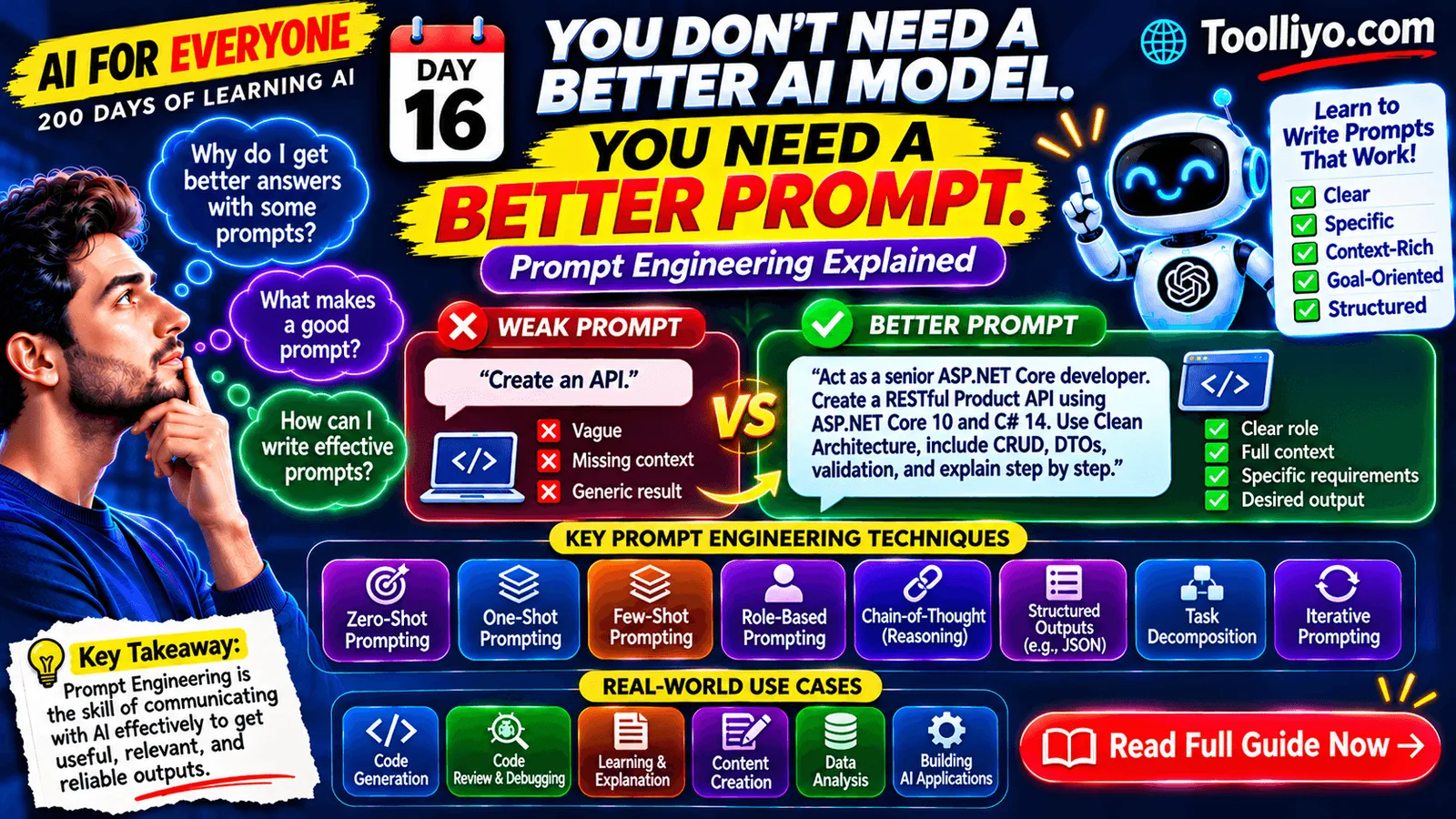
Imagine asking an AI assistant to build an application. You type:
"Create an API."
The AI generates something, but it doesn't match your requirements. It uses the wrong framework, misses important functionality, and provides little explanation.
Now try this:
"Act as a senior ASP.NET Core developer. Build a Product REST API using ASP.NET Core 10 and C# 14. Follow Clean Architecture. Implement CRUD endpoints, DTOs, validation, dependency injection, and proper HTTP status codes. Use static data instead of a database. Explain the code step by step."
The difference is significant.
The AI model may be exactly the same. But the second instruction gives it a much clearer understanding of what you need.
This is where Prompt Engineering becomes important.
In this guide, we'll understand prompt engineering from the beginning, explore practical techniques, and learn how developers and professionals can use them in real-world situations.
1. What Is Prompt Engineering?
Prompt Engineering is the process of designing and refining instructions given to an AI model to guide it toward a useful, relevant, and desired response.
A prompt is the input you provide to an AI system.
It might be:
-
A question.
-
An instruction.
-
A paragraph of context.
-
A code-generation request.
-
An image-generation description.
-
A collection of rules and examples.
-
A structured request containing multiple requirements.
Prompt Engineering focuses on making those instructions clear, specific, and useful.
Simple definition:
Prompt Engineering is the skill of communicating with AI systems so they understand what you want and produce better results.
It is useful when working with:
-
ChatGPT and other AI assistants.
-
Large Language Models (LLMs).
-
AI coding assistants.
-
Image and video generation tools.
-
AI-powered business applications.
-
AI agents and automated workflows.
2. Why Is Prompt Engineering Important?
AI models are powerful, but they do not automatically know your intentions, business requirements, technical environment, or expectations.
Consider these examples.
Example 1: Learning
Weak prompt:
"Explain microservices."
Better prompt:
"Explain microservices to a beginner developer. Use a simple e-commerce application example. Explain the difference between monolithic and microservices architecture, their advantages, disadvantages, and when to use each approach."
Example 2: Content creation
Weak prompt:
"Write a LinkedIn post about AI."
Better prompt:
"Write a professional LinkedIn post about how AI is changing software development. Start with a strong hook, explain three practical examples, use a conversational tone, and finish with a question that encourages discussion."
Example 3: Debugging
Weak prompt:
"Fix this error."
Better prompt:
"Analyze the following ASP.NET Core exception. Identify the likely root cause, explain why it occurs, provide a step-by-step debugging process, and suggest a production-ready solution. Do not assume that the database is the problem."
The better prompts provide context and define the expected outcome.
Why it matters:
-
Better relevance: Responses are more closely aligned with your task.
-
Less ambiguity: The model has fewer gaps to interpret.
-
Better structure: You can request a particular format.
-
Improved productivity: Less time is spent correcting generic answers.
-
More control: You can specify constraints, tone, audience, and output.
-
Reusability: Effective prompts can become repeatable templates.
However, prompt engineering does not guarantee correctness. AI models can still hallucinate, misunderstand instructions, or produce outdated information. Always validate important outputs.
3. How Does Prompt Engineering Work?
Let's understand the basic interaction.
-
You write a prompt.
-
The AI application sends your input to a model.
-
The model processes the available context and instructions.
-
It generates a response based on patterns learned during training and the current input.
-
Your application displays the response.
-
You evaluate the result and refine the prompt if necessary.
For a language model, the input is processed as tokens. The model uses the available context to predict and generate subsequent tokens.
A simplified workflow:
Your Instructions → Tokenization → Model Processing → Generated Response
Remember: the model does not automatically understand your intention like a human colleague. It generates responses based on the instructions and context it receives.
4. Anatomy of a Good Prompt
A useful prompt often contains several components.
1. Role
Tell the AI what perspective or expertise to adopt.
Example:
"Act as a senior software architect."
2. Task
Clearly explain what you want it to do.
Example:
"Design a scalable e-commerce backend."
3. Context
Provide relevant background information.
Example:
"The application supports thousands of customers and multiple product categories."
4. Constraints
Specify what the AI must or must not do.
Example:
"Use ASP.NET Core 10, C# 14, and SQL Server. Do not use Python or TypeScript."
5. Output format
Tell the AI how to present the result.
Example:
"Present the architecture first, followed by implementation steps and code examples."
6. Quality criteria
Explain what a good result should achieve.
Example:
"Follow SOLID principles, include error handling, and explain important design decisions."
A reusable prompt structure:
Role:
Act as a [specific role].

Task:
Your task is to [specific objective].

Context:
Here is the background information: [context].

Constraints:
Follow these requirements:
- [Requirement 1]
- [Requirement 2]
- [Requirement 3]

Output Format:
Present the response as [format].

Quality Criteria:
Ensure the result is [quality expectations].
Not every prompt needs every component. Use the components that matter for the task.
5. Important Prompt Engineering Techniques
Let's explore techniques you can use immediately.
Technique 1: Zero-Shot Prompting
Zero-shot prompting means asking an AI model to perform a task without providing examples.
Example:
Classify this customer feedback as Positive,
Negative, or Neutral.

Feedback:
"The delivery was late, but the product quality
was excellent."
You provide the task and input, but no sample answers.
When to use it:
-
Simple classification.
-
Summarization.
-
Translation.
-
General explanations.
-
Straightforward question answering.
Technique 2: One-Shot Prompting
One-shot prompting provides one example to demonstrate the expected response.
Example:
Convert the following sentence into a support ticket.

Example:

Input:
"I cannot log into my account."

Output:
Category: Authentication
Priority: Medium
Issue: Login failure

Now process:

Input:
"My payment was deducted, but my order
was not created."
The example demonstrates the expected structure.
When to use it: When the model needs a specific response pattern.
Technique 3: Few-Shot Prompting
Few-shot prompting provides multiple examples before asking the model to perform a task.
Example:
Classify customer support messages.

Example 1:
Message: "I cannot log in."
Category: Authentication

Example 2:
Message: "My payment failed."
Category: Payment

Example 3:
Message: "My order has not arrived."
Category: Delivery

Now classify:

Message:
"I was charged twice for one order."
The examples help establish the expected classification pattern.
When to use it:
-
Consistent classification.
-
Structured data extraction.
-
Formatting tasks.
-
Domain-specific language.
-
Repeated business workflows.
Technique 4: Role-Based Prompting
Give the model a specific role or perspective.
Example:
Act as a senior database architect.

Review this SQL query for:
1. Performance issues.
2. Missing indexes.
3. Unnecessary joins.
4. Scalability concerns.

Provide an optimized version and explain
the improvements.
This helps establish the perspective and criteria expected in the response.
Important: assigning a role does not give the model real-world credentials or guarantee expert-level correctness.
Technique 5: Contextual Prompting
Provide the background information the model needs.
Example:
We are developing an e-commerce application.

Backend: ASP.NET Core 10
Frontend: React 19
Database: SQL Server

We need to implement product search.

Requirements:
- Search by product name.
- Filter by category.
- Support pagination.
- Sort by price.
- Return DTOs.

Suggest an API design.
Without context, the AI may make assumptions that do not match your application.
Technique 6: Structured Output Prompting
Ask the model to return information in a specific format.
Example:
Extract the following information from the text.

Return valid JSON with these fields:

{
  "customerName": "",
  "email": "",
  "orderId": "",
  "issue": "",
  "priority": ""
}
Structured output is especially useful when integrating AI into software applications.
For production systems, use supported structured-output or JSON-schema features where available, and validate the result before processing it.
Technique 7: Task Decomposition
Break a complex task into smaller steps.
Instead of:
"Build a complete AI-powered CRM."
Use:
Step 1: Identify CRM requirements.
Step 2: Design the system architecture.
Step 3: Define the database entities.
Step 4: Design REST APIs.
Step 5: Implement authentication.
Step 6: Build customer management.
Step 7: Integrate the AI assistant.
Step 8: Add testing and monitoring.
Complex tasks are easier to manage when the requirements, outputs, and validation criteria are handled incrementally.
Technique 8: Iterative Prompting
Do not expect every first response to be perfect.
Use a feedback loop:
-
Write the initial prompt.
-
Review the response.
-
Identify missing information.
-
Add clarification.
-
Request corrections.
-
Verify the final output.
Example:
First prompt:
"Create a React login page."
Follow-up:
"Improve the layout with responsive design, form validation, accessible labels, loading state, and clear error messages. Use React 19 with JavaScript and JSX."
Prompting is often an iterative process.
6. What Are System, Developer, and User Instructions?
When working with modern LLM APIs, you may encounter different instruction roles.
System instructions
These define high-level behavior, identity, and rules for the model or assistant.
Example:
"You are a helpful customer support assistant. Never reveal confidential customer information."
Developer instructions
These define how the application developer wants the AI assistant to behave within a particular application.
Example:
"Answer only questions related to our product documentation. If the answer is unavailable, say that you do not know."
User instructions
These contain the task or question submitted by the end user.
Example:
"How can I reset my password?"
A simplified hierarchy is commonly used to describe these instruction levels, but exact behavior and priority depend on the model and API. Some platforms also support tool instructions and other message types.
Why developers should understand this:
When you build AI-powered applications, you should not put every instruction into a single user prompt. Separate application-level rules from user-provided content wherever the API supports it.
Also treat user-provided documents and retrieved content as untrusted input. They should not be allowed to override your application's security rules.
7. What Is Chain-of-Thought Prompting?
Chain-of-thought refers to reasoning steps associated with solving a problem.
A common beginner approach is to ask:
"Explain the solution step by step."
For example:
Solve this database performance problem.

Explain:
1. The possible causes.
2. How to investigate them.
3. The trade-offs of different solutions.
4. How to verify the improvement.
Modern reasoning models may perform internal reasoning without exposing their full internal reasoning process.
As an application developer, focus on requesting useful outputs: assumptions, conclusions, concise explanations, evidence, calculations, and verification steps. You do not need access to a model's private internal reasoning to evaluate its answer.
8. Advanced Prompting: Constraints and Guardrails
A strong prompt can define boundaries.
Example:
You are an ASP.NET Core coding assistant.

Rules:
- Use C#.
- Follow SOLID principles.
- Use dependency injection.
- Do not invent package names or API methods.
- Mention assumptions explicitly.
- If requirements are unclear, ask questions.
- Include error handling.
- Explain security considerations.
Constraints are particularly valuable in software development and enterprise AI applications.
However, prompts are not a security boundary. Enforce authorization, validation, data access restrictions, and other security controls in your application code.
9. Practical Prompt Engineering for Developers
Let's look at practical examples for different technology stacks.
Example A: ASP.NET Core API development
Act as a senior ASP.NET Core developer.

Build a Product CRUD API using ASP.NET Core 10
and C# 14.

Requirements:
- Follow Clean Architecture.
- Create Product entity.
- Create request and response DTOs.
- Implement CRUD endpoints.
- Add validation.
- Use dependency injection.
- Return appropriate HTTP status codes.
- Use static data instead of a database.

Explain each implementation step.
Example B: React development
Act as a senior React developer.

Create a responsive product listing page
using React 19, JavaScript, JSX, and Vite.

Requirements:
- Display product cards.
- Add category filters.
- Implement search.
- Add sorting.
- Include loading and empty states.
- Use reusable components.
- Do not use TypeScript.

Explain the component structure.
Example C: SQL optimization
Act as a SQL Server performance specialist.

Analyze this query.

Identify:
- Potential performance bottlenecks.
- Missing index opportunities.
- Expensive operations.
- Possible query improvements.

Explain the trade-offs.

Do not recommend indexes without
considering query patterns and write overhead.
Example D: AI application development
Act as an AI application architect.

Design a document question-answering
application using RAG.

Technology:
- ASP.NET Core 10
- An LLM API
- Embedding model
- Vector database
- SQL Server for application data

Explain:
1. Document ingestion.
2. Chunking.
3. Embedding generation.
4. Vector storage.
5. Retrieval.
6. Prompt construction.
7. Response generation.
8. Security and authorization.
9. Evaluation and monitoring.
These prompts provide a starting point. Real applications still require architecture decisions, testing, security review, and validation.
10. Prompt Engineering vs. Fine-Tuning vs. RAG
We studied Fine-Tuning in Day 15 and RAG in Day 14. Let's compare them.
| Approach | Main purpose | Example |
|---|---|---|
| Prompt Engineering | Guide model behavior through instructions and context | Ask an AI to respond as a support assistant |
| RAG | Give the model relevant external information at response time | Answer questions using company documents |
| Fine-Tuning | Adapt a model using additional training | Improve performance on a specialized task or response pattern |
Prompt Engineering: Start here when you need better instructions or output formatting.
RAG: Consider this when answers must use external, changing, or private knowledge.
Fine-Tuning: Consider this when you need persistent changes in model behavior and have a suitable training dataset and evaluation process.
These approaches can also be combined.
For example, an enterprise support assistant can use:
-
Prompt Engineering for response instructions.
-
RAG for retrieving approved company documentation.
-
Fine-Tuning when a specialized behavior warrants it.
11. Common Prompt Engineering Mistakes
Avoid these mistakes:
1. Writing vague prompts
"Make something good" does not explain what good means.
2. Missing context
The model cannot reliably infer your complete business or technical environment.
3. Combining unrelated tasks
Break complex requests into manageable steps.
4. Ignoring constraints
Mention required technologies, frameworks, versions, and restrictions.
5. Assuming every response is correct
Verify code, facts, calculations, and recommendations.
6. Providing sensitive information unnecessarily
Do not paste passwords, API keys, personal customer information, or confidential data into an AI service without an approved data-handling process.
7. Not testing prompts
Test your prompts against multiple inputs, including edge cases.
8. Expecting prompts to enforce security
Use real authorization, validation, and access controls in your application. A prompt alone cannot protect sensitive data.
12. How to Improve Your Prompt Engineering Skills
Follow this practical learning process:
-
Start with a simple prompt.
-
Add a clear task.
-
Provide the relevant context.
-
Specify the expected output.
-
Add constraints.
-
Test the prompt with different inputs.
-
Compare the outputs.
-
Refine the prompt.
-
Save reusable prompt templates.
-
Evaluate whether the result is actually correct.
A useful exercise is to take one vague prompt and rewrite it in three progressively better versions.
This helps you understand how each additional instruction changes the output.
13. Your Practical Challenge: Build a Prompt Library
Create a small personal prompt library containing five reusable prompts:
-
Learning Assistant: Explain a technical concept with beginner-friendly examples.
-
Coding Assistant: Generate code following your chosen architecture and coding standards.
-
Code Reviewer: Review code for maintainability, security, and performance.
-
Content Assistant: Generate structured content for a defined audience.
-
Research Assistant: Summarize information, distinguish facts from assumptions, and provide sources.
Test each prompt with at least three different inputs.
Record:
-
The prompt.
-
The expected result.
-
The actual result.
-
What went wrong.
-
What you changed.
-
Whether the revised output improved.
This turns prompt engineering from guesswork into a repeatable process.
14. Frequently Asked Questions
Q1. Is Prompt Engineering a programming language?
No. It is a technique for designing instructions for AI systems. You can use it without writing code.
Q2. Do I need technical knowledge to learn Prompt Engineering?
No. Beginners can start with simple questions and instructions. Technical knowledge becomes useful when designing complex workflows and AI applications.
Q3. Is Prompt Engineering still useful as AI models improve?
Yes. Better models can interpret instructions more effectively, but context, requirements, constraints, and evaluation remain important.
Q4. What is the difference between zero-shot and few-shot prompting?
Zero-shot prompting provides no examples. Few-shot prompting includes several examples to demonstrate the expected pattern.
Q5. Can Prompt Engineering prevent AI hallucinations?
It can help reduce ambiguity and encourage the model to state uncertainty, but it cannot guarantee factual accuracy. Use trusted sources, retrieval, validation, and human review when needed.
Q6. Is Prompt Engineering useful for .NET and Node.js developers?
Absolutely. It helps developers work with AI coding assistants, design LLM-powered applications, create structured outputs, and build AI workflows.
Q7. Should I learn Prompt Engineering before RAG and Agentic AI?
Yes. Understanding prompts provides a useful foundation for working with LLM APIs, RAG pipelines, and AI agents.
Conclusion: Better Instructions, Better AI Experiences
Prompt Engineering is one of the most accessible skills in the AI ecosystem.
You don't need to train an AI model or build a complex application to start learning it. You can begin by improving the way you ask questions.
Remember these six principles:
-
Define the role.
-
Explain the task.
-
Provide context.
-
Set constraints.
-
Specify the output.
-
Verify the result.
The goal isn't to write the longest prompt. The goal is to communicate the clearest instructions.
As AI becomes part of everyday work, the ability to collaborate effectively with AI systems will become increasingly valuable.
Continue Learning — AI for Everyone
This article is Day 16 of our 200 Days of Learning AI series.
Explore more practical learning resources at Toolliyo.com.
Looking for personalized developer mentorship, career guidance, or interview preparation? Visit Topmate.
Tomorrow — Day 17: What Are AI Hallucinations? Why AI Makes Up Answers and How to Reduce Them.
Learn one AI concept every day. Build your understanding step by step.
