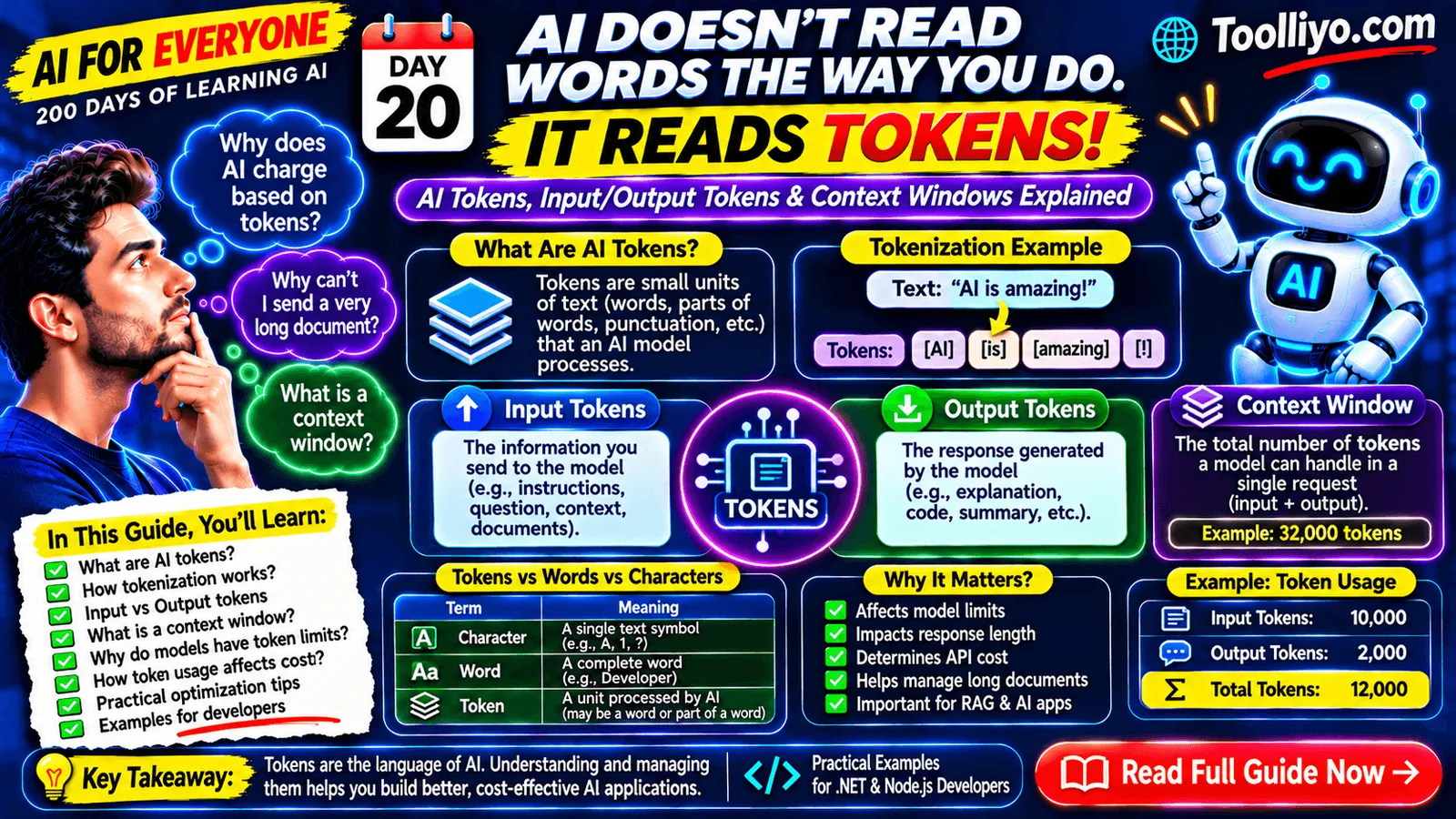
AI for Everyone — 200 Days of Learning AI | Day 20
Have you ever wondered why an AI API charges you based on tokens instead of words?
Or why an AI assistant sometimes cannot process an extremely long document?
Perhaps you've noticed that an AI chatbot can remember parts of a conversation but may lose track of information shared much earlier.
These behaviors are connected to two important concepts in Generative AI:
Tokens and Context Windows.
Every time you interact with a Large Language Model (LLM), your input is processed into tokens. The model uses these tokens as part of its input and generates its response as a sequence of output tokens.
Understanding tokens is essential when working with ChatGPT, LLM APIs, RAG applications, AI agents, and enterprise AI systems.
In this guide, we'll understand how tokens work, why context windows matter, how input and output tokens differ, and how developers can manage token usage in real-world applications.
1. What Are AI Tokens?
A token is a unit of text that a language model processes.
When you type a sentence into an AI assistant, the model does not necessarily process it as individual words.
Instead, a tokenizer divides the text into smaller units called tokens.
A token can represent:
-
A complete word.
-
Part of a word.
-
A punctuation mark.
-
A number or part of a number.
-
A whitespace-containing text segment.
-
Other text units, depending on the tokenizer.
For example, the sentence:
"Artificial Intelligence is transforming technology."
may be divided into multiple tokens.
The exact token boundaries depend on the model's tokenizer.
Simple definition:
Tokens are the basic text units used by language models to process input and generate output.
Why should you care?
Because tokens influence:
-
Model input limits.
-
Response length.
-
API usage.
-
Processing cost.
-
Context management.
-
Application performance.
2. What Is Tokenization?
Tokenization is the process of converting text into tokens that a language model can process.
Let's understand the basic workflow.
Suppose you enter:
"Hello, how are you?"
A tokenizer processes the text and converts it into token IDs.
Simplified workflow:
Text → Tokenizer → Token IDs → Language Model
The model processes these token IDs and generates new token IDs.
Those generated IDs are then converted back into readable text.
Simplified generation workflow:
Input Tokens → Model Processing → Output Token IDs → Decoded Text
Tokenization is an important part of how modern language models work.
Example
Consider this sentence:
"Developers are building AI applications."
A tokenizer may split it into pieces representing:
-
Developers
-
are
-
building
-
AI
-
applications
-
punctuation
But this is only an illustrative word-level breakdown. Real tokenizers may split individual words into multiple subword tokens.
For example, an unfamiliar technical term may be divided into smaller pieces.
Important: Different models can use different tokenizers. The same sentence may produce different token counts in different models.
3. Tokens vs. Words vs. Characters
These three terms are not interchangeable.
| Term | Meaning | Example |
|---|---|---|
| Character | Individual text symbol | A, B, 1, ? |
| Word | A linguistic word | Developer |
| Token | A unit produced by a tokenizer | May be a word or word fragment |
Let's take this sentence:
"Developers build applications."
It contains three words, but the tokenizer may produce more than three tokens.
Why?
Because words can be split into smaller units.
For example, a tokenizer may represent a long or uncommon word using multiple subword tokens.
Are 1,000 words equal to 1,000 tokens?
No.
Token counts depend on:
-
Language.
-
Vocabulary.
-
Word frequency.
-
Punctuation.
-
Numbers.
-
Special tokens.
-
The tokenizer being used.
For some English text, a rough estimate is that one token corresponds to around three-quarters of a word on average.
This is only a rule of thumb, not an exact conversion.
Code, URLs, technical terminology, and multilingual text can behave differently.
4. How Does a Language Model Use Tokens?
Let's understand the process when you ask an AI assistant a question.
Example:
"Explain dependency injection in ASP.NET Core."
The workflow is:
-
You submit the text.
-
The application prepares the model input.
-
The tokenizer converts the input into tokens.
-
The model processes those tokens.
-
The model generates output tokens.
-
The tokenizer decodes the output into readable text.
-
The application displays the response.
A simplified architecture:
User Message
     |
     v
Tokenization
     |
     v
Input Token IDs
     |
     v
LLM Processing
     |
     v
Output Token IDs
     |
     v
Detokenization
     |
     v
Generated Response
Modern language models may also receive additional structured information, such as system instructions, tool results, multimodal content, or special tokens.
5. What Are Input Tokens?
Input tokens are the tokens supplied to the model as part of the input for a request.
They can include:
-
System instructions.
-
Developer instructions.
-
User messages.
-
Conversation history.
-
Retrieved documents.
-
Tool outputs.
-
Other supported input content.
Consider a customer support chatbot.
The user asks:
"Can I return my order?"
But the model may also receive:
System instructions:
You are a customer support assistant.

Company policy:
Products can be returned within 14 days.

Conversation:
The customer previously mentioned an order number.

User question:
Can I return my order?
All this information contributes to the model's input.
It is not just the customer's latest question that matters.
Why input tokens matter
More input tokens can mean:
-
More information available to the model.
-
Higher input-token usage.
-
Greater processing requirements.
-
Less remaining capacity for generated output within a fixed context limit.
The exact billing and processing behavior depends on the provider and model.
6. What Are Output Tokens?
Output tokens are the tokens generated by the model in its response.
For example, you ask:
"What is dependency injection?"
The AI generates:
"Dependency Injection is a design pattern that allows an object to receive its dependencies from an external source instead of creating them directly."
The generated response is converted into output tokens.
Why output tokens matter
Output tokens influence:
-
Response length.
-
Generation time.
-
API usage.
-
Output-related costs.
-
Maximum response size.
A short answer generally consumes fewer output tokens than a detailed explanation.
However, the exact number depends on the tokenizer and generated content.
7. Input Tokens vs. Output Tokens
Let's compare them.
| Feature | Input Tokens | Output Tokens |
|---|---|---|
| Meaning | Information supplied to the model | Information generated by the model |
| Source | Prompt, instructions, history, context | AI response |
| Controlled by | Application and user input | Model generation and output limits |
| Example | A 2,000-token document | A 500-token summary |
| Cost | Depends on provider pricing | Depends on provider pricing |
Some providers also distinguish between categories such as cached input tokens, reasoning tokens, or other model-specific usage types.
Always check the provider's usage documentation.
8. What Is a Context Window?
Now let's understand one of the most important concepts in LLMs.
A Context Window is the amount of context a model can process for a particular request, measured in tokens.
Think of it as the model's available working space for a request.
It can contain:
-
Instructions.
-
User input.
-
Conversation history.
-
Retrieved documents.
-
Tool outputs.
-
Other model-supported content.
Imagine a model has a context window of 32,000 tokens.
That does not mean you can send 32,000 input tokens and always receive an additional unlimited response.
The input and generated output must fit within the applicable context constraints.
A simplified example:
| Component | Tokens |
|---|---|
| System and developer instructions | 2,000 |
| Conversation history | 5,000 |
| Retrieved documents | 10,000 |
| Current user question | 1,000 |
| Available output budget | 14,000 |
| Total | 32,000 |
This is an illustrative allocation, not a universal context-window calculation.
Actual limits and accounting vary by model and provider.
Why context windows matter
Suppose you are building an AI assistant that analyzes long documents.
A user uploads a large document containing 100 pages.
The application may not be able to send the entire document in one request.
You may need to:
-
Extract the relevant content.
-
Split the document into chunks.
-
Retrieve the most relevant sections.
-
Summarize previous conversation history.
-
Manage the remaining context budget.
This is why context management is an important part of AI application architecture.
9. What Happens When the Context Window Is Full?
When a request exceeds a model's supported context limit, the API may reject the request or require the application to reduce or restructure its input.
The exact behavior depends on the platform.
For example, an AI chatbot has a long conversation:
-
User asks a question.
-
AI responds.
-
User asks another question.
-
AI responds.
-
The conversation continues for hundreds of messages.
If the application sends the entire conversation every time, the input can eventually become too large.
Possible solutions include:
1. Conversation summarization
Summarize older messages and preserve important information.
2. Message selection
Include only the relevant conversation history.
3. RAG
Retrieve relevant documents instead of sending the entire knowledge base.
4. Context compression
Remove unnecessary information while preserving essential details.
5. Conversation segmentation
Separate unrelated tasks into different conversation contexts.
The goal is to provide the model with the information it needs without wasting the available context budget.
10. What Is the Difference Between Context Window and Maximum Output Tokens?
These two concepts are related but different.
Context window
Defines the total context capacity available for a model request, according to the model's rules.
Maximum output tokens
Defines the maximum number of tokens the model is allowed to generate in its response, subject to the model and API constraints.
Example:
Imagine a model supports a 32,000-token context window.
Your request uses 10,000 input tokens.
You configure an output limit of 2,000 tokens.
The model may generate up to the configured output limit if the request is accepted and the provider's constraints allow it.
It does not automatically generate 22,000 tokens.
The maximum output setting is a separate control.
11. Why Do AI APIs Charge Based on Tokens?
Many AI providers use token-based pricing.
You may be charged separately for:
-
Input tokens.
-
Output tokens.
-
Cached input tokens.
-
Other model-specific token categories.
The pricing depends on the selected model and provider.
Let's understand with a hypothetical example.
Suppose an AI provider charges:
-
₹X per 1,000 input tokens.
-
₹Y per 1,000 output tokens.
Your application uses:
-
10,000 input tokens.
-
2,000 output tokens.
The estimated usage cost would be:
[
\text{Cost} =
\left(\frac{10,000}{1,000} \times X\right)
+
\left(\frac{2,000}{1,000} \times Y\right)
]
This is a simplified pricing formula.
Actual billing may include additional token categories, minimums, currency conversion, and other charges.
Why developers should care
Imagine your application serves 10,000 users daily.
Each user sends an average of 20 requests.
That is:
[
10,000 \times 20 = 200,000
]
AI requests per day.
If every request includes unnecessary conversation history and large documents, token consumption can increase significantly.
Token optimization can directly improve operating costs.
12. How to Count AI Tokens
You cannot accurately count tokens by simply counting words or characters.
Use the tokenizer associated with the model you are working with.
Common approaches include:
-
Provider-specific token counting tools.
-
Official tokenizer libraries.
-
API usage metadata.
-
Model playgrounds.
-
SDK utilities where supported.
For example, some model providers expose token usage in the API response.
An illustrative response:
{
  "usage": {
    "input_tokens": 1200,
    "output_tokens": 450,
    "total_tokens": 1650
  }
}
The actual response fields vary by provider.
This usage information is valuable for monitoring costs and application performance.
13. How Developers Can Optimize Token Usage
If you are building AI applications using ASP.NET Core, Node.js, or React, token optimization should be part of your architecture.
Here are practical techniques.
Technique 1: Remove Unnecessary Context
Do not send every previous conversation message when it is no longer relevant.
Select only the context needed for the current task.
Technique 2: Use RAG
Instead of sending thousands of pages of documents, retrieve relevant chunks.
For example:
A company has 10,000 pages of internal documentation.
Rather than sending all 10,000 pages to the model, retrieve the most relevant sections for each question.
This can reduce input usage and improve relevance.
Technique 3: Summarize Conversation History
For long-running conversations, maintain a summary of earlier interactions.
Keep important information such as:
-
User requirements.
-
Technical decisions.
-
Relevant constraints.
-
Outstanding tasks.
Avoid retaining irrelevant details.
Technique 4: Control Output Length
Ask for the appropriate response length.
Example:
Explain dependency injection in ASP.NET Core.

Use:
- A short definition.
- One practical example.
- Three important benefits.

Keep the response concise.
Use a supported maximum-output-token parameter where available.
Technique 5: Optimize Document Chunking
In RAG applications, poor chunking can create unnecessary context.
Use suitable chunk sizes and overlap based on the document type and retrieval strategy.
Evaluate retrieval quality rather than selecting chunk sizes blindly.
Technique 6: Use Token Usage Monitoring
Track:
-
Input tokens.
-
Output tokens.
-
Total tokens.
-
Cost per request.
-
Average tokens per user.
-
Model usage.
-
Failed requests.
This helps identify expensive workflows.
Technique 7: Choose the Right Model
Not every task requires the most expensive model.
Use models that meet the quality, latency, context, and cost requirements of the task.
Evaluate performance before choosing a model for production.
14. Practical Developer Example: Token Usage Tracking
When building an AI application, you should capture token usage returned by the provider.
A simple C# application-level model might look like this:
public class TokenUsage
{
    public int InputTokens { get; set; }

    public int OutputTokens { get; set; }

    public int TotalTokens { get; set; }
}
You can use this information for monitoring and reporting.
For example:
public class AiRequestLog
{
    public string ModelName { get; set; } = string.Empty;

    public int InputTokens { get; set; }

    public int OutputTokens { get; set; }

    public int TotalTokens { get; set; }

    public DateTime CreatedAt { get; set; }
}
Your AI service can map the provider's usage metadata into these application models.
You can then build dashboards showing:
-
Daily token consumption.
-
Monthly token usage.
-
Average tokens per request.
-
Cost by model.
-
Cost by application feature.
-
Usage by customer or tenant.
In multi-tenant applications, enforce tenant-level usage limits and protect usage data through appropriate authorization.
15. Tokens in RAG Applications
Tokens are especially important in Retrieval-Augmented Generation.
Let's imagine you are building an AI document assistant.
A user uploads a PDF and asks:
"Explain the company's leave policy."
A simplified RAG workflow:
-
Extract text from the PDF.
-
Split the document into chunks.
-
Generate embeddings for those chunks.
-
Store the embeddings in a vector database.
-
Retrieve relevant chunks when a user asks a question.
-
Build a prompt containing the retrieved context.
-
Send the prompt to the LLM.
-
Generate an answer.
Where do tokens matter?
-
The user's question consumes input tokens.
-
System and developer instructions consume input tokens.
-
Retrieved document chunks consume input tokens.
-
Conversation history consumes input tokens.
-
The generated answer consumes output tokens.
If you retrieve too many chunks, you may waste context and increase cost.
If you retrieve too few, the model may not have sufficient evidence to answer.
The goal is to retrieve the most relevant information within an appropriate token budget.
16. Common Myths About AI Tokens
Myth 1: One word always equals one token.
Reality: A word may be represented by one or multiple tokens, depending on the tokenizer.
Myth 2: Every model uses the same tokenizer.
Reality: Tokenization varies across models and providers.
Myth 3: Context window means maximum response length.
Reality: The context window and output-token limit are separate concepts.
Myth 4: More tokens always mean better answers.
Reality: Irrelevant context can waste resources and sometimes make responses less focused.
Myth 5: Input tokens are the only tokens that cost money.
Reality: Many providers charge for both input and output usage, with pricing depending on the model and token category.
Myth 6: A model remembers everything from every previous conversation.
Reality: The model can only use information available in its current context and any external memory or retrieval mechanisms provided by the application.
17. Your Practical Challenge: Build an AI Token Usage Tracker
Try building a simple dashboard that tracks token consumption from your LLM API requests.
Your dashboard should display:
-
Model name.
-
Input tokens.
-
Output tokens.
-
Total tokens.
-
Request date.
-
Estimated request cost.
-
Daily token consumption.
-
Monthly token consumption.
Suggested technology:
-
Backend: ASP.NET Core 10 or Node.js.
-
Frontend: React 19.
-
Database: SQL Server or MongoDB.
-
AI integration: An LLM API.
For every request, capture the provider's actual usage metadata.
Calculate estimated costs using the applicable model pricing and token categories.
This project will help you understand how AI usage is measured in real production applications.
18. Frequently Asked Questions
Q1. What are AI tokens?
AI tokens are the text units processed by language models. A token may represent a word, part of a word, punctuation, or another text segment.
Q2. How many tokens are in 1,000 words?
There is no exact conversion. For some English text, a rough estimate is around 1,300 tokens, but the actual count depends on the tokenizer and content.
Q3. What is a context window in AI?
A context window is the amount of context a model can process for a request, measured in tokens.
Q4. What are input tokens and output tokens?
Input tokens are supplied to the model. Output tokens are generated by the model in its response.
Q5. Why do AI APIs charge based on tokens?
Token usage is one way providers measure model processing and generation. Pricing varies by model and provider.
Q6. What happens when an LLM context window is full?
A request that exceeds the supported context limit may be rejected or need to be shortened or restructured. Applications can use summarization, retrieval, and context management to address this.
Q7. How can developers reduce token usage?
Remove unnecessary context, use RAG, summarize long conversations, retrieve relevant document chunks, control response length, and monitor usage.
Q8. Does a larger context window always mean a better model?
No. A larger context window allows more information to be supplied, but response quality also depends on retrieval, attention, model capabilities, and task design.
Conclusion: Tokens Are the Foundation of LLM Interaction
Tokens are one of the most fundamental concepts in Generative AI.
They influence how language models process information, generate responses, manage context, and measure API usage.
Remember these important concepts:
-
Text is converted into tokens through tokenization.
-
Input tokens contain information supplied to the model.
-
Output tokens represent generated responses.
-
Context windows define the available context capacity.
-
Maximum output tokens control response generation limits.
-
Token usage can influence API costs.
-
Context optimization improves application efficiency.
If you want to build production-ready AI applications, you must understand not only how to call an LLM API but also how to manage the tokens going into and coming out of it.
Continue Learning — AI for Everyone
This is Day 20 of 200 Days of Learning AI.
Explore practical developer resources at Toolliyo.com.
For personalized developer mentorship, interview preparation, and career guidance, visit Topmate.
Tomorrow — Day 21: What Is a Context Window? How AI Remembers and Processes Long Conversations.
Learn one AI concept every day. Build your understanding step by step.
