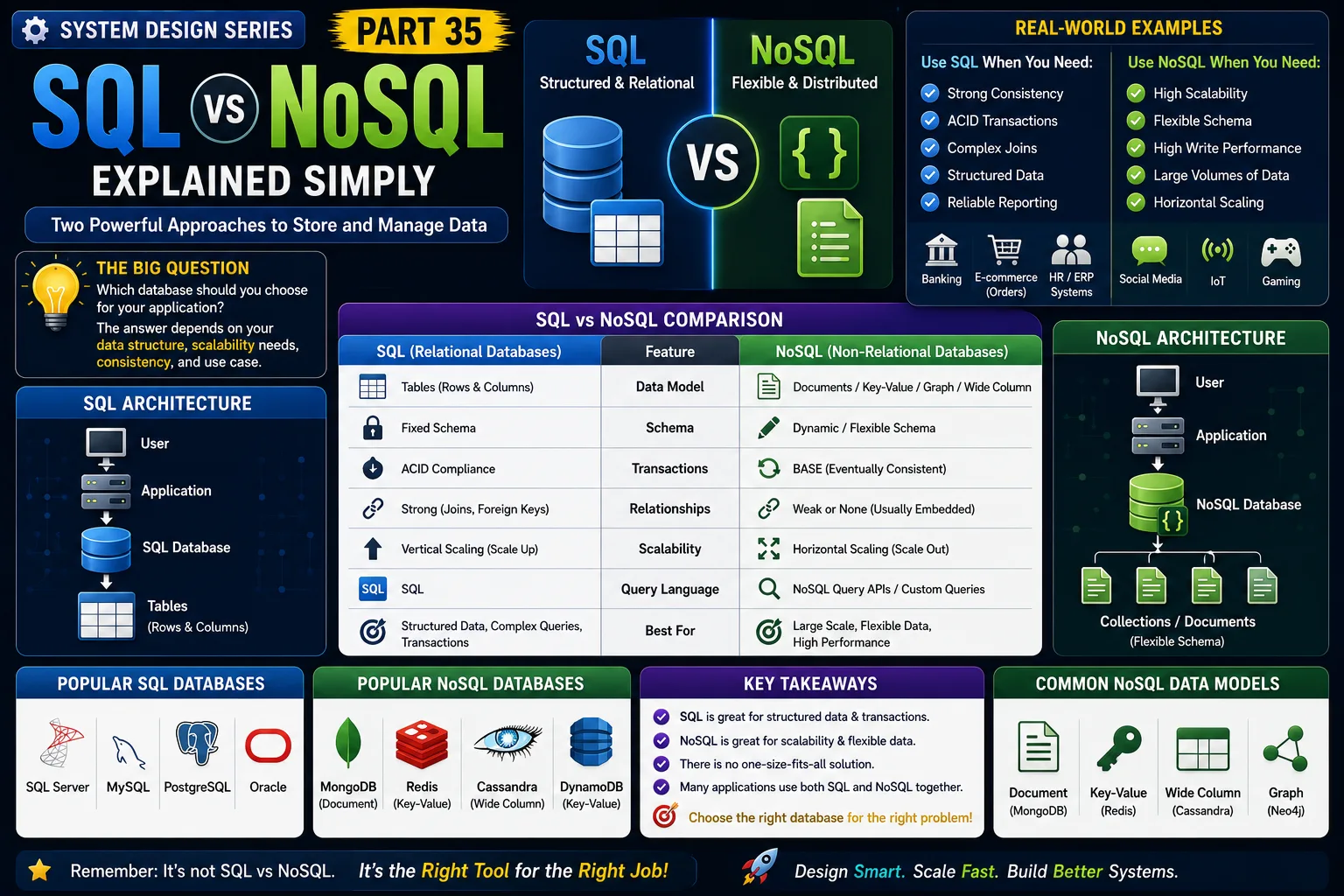
System Design Series — Part 35
Imagine you're building the next Amazon.
Your application needs to store:
-
Customer information
-
Product catalog
-
Orders
-
Payments
-
Reviews
-
Shopping carts
One of the first questions you'll face is:
Should I use SQL or NoSQL?
There isn't a single correct answer.
Some of the world's biggest companies use both.
Choosing the wrong database can lead to:
-
Slow performance
-
Scaling problems
-
High infrastructure costs
-
Complex development
Let's understand when to choose SQL, when to choose NoSQL, and why.
The Real Problem
Imagine your application is growing rapidly.
Initially, you have:
1,000 users.
Everything works well.
A year later,
you have:
10 million users.
The amount of data grows every second.
Now you must decide:
Do you need:
✔ Strong consistency?
✔ Flexible schema?
✔ Massive scalability?
The answer determines your database choice.
A Simple Real-World Analogy
Imagine you're organizing documents.
SQL Database
You use a filing cabinet.
Every folder has the same structure.
Name
Phone
Address
Everything is organized.
Easy to search.
Easy to validate.
NoSQL Database
Imagine a large storage room.
Every box can contain different items.
One box has books.
Another has clothes.
Another has electronics.
No fixed structure.
More flexibility.
That's the difference.
What is SQL?
SQL stands for:
Structured Query Language
SQL databases store data in:
Rows
and
Columns.
Every row follows the same schema.
Popular SQL databases include:
-
SQL Server
-
MySQL
-
PostgreSQL
-
Oracle
SQL is ideal for structured, relational data.
What is NoSQL?
NoSQL means:
Not Only SQL
Instead of tables,
NoSQL databases store data in different formats.
Examples:
-
Documents
-
Key-Value pairs
-
Graphs
-
Wide Columns
Popular NoSQL databases include:
-
MongoDB
-
Redis
-
Cassandra
-
DynamoDB
-
Couchbase
NoSQL is designed for flexibility and horizontal scalability.
SQL Architecture
User
↓
Application
↓
SQL Query
↓
Relational Database
↓
Tables
↓
Rows
Relationships are maintained using:
Primary Keys
Foreign Keys
Joins
NoSQL Architecture
User
↓
Application
↓
NoSQL Database
↓
Collections
↓
Documents
Each document can have different fields.
No complex joins are required.
Real-World Example
Imagine Amazon.
Orders
Need:
-
Transactions
-
Consistency
-
ACID compliance
SQL is an excellent choice.
Product Catalog
Products have different attributes.
Example:
Laptop
RAM
CPU
SSD
Phone
Camera
Battery
Display
Schemas vary significantly.
NoSQL is often a better fit.
Many e-commerce platforms use both databases together.
Another Example
Imagine Instagram.
User profile:
Simple relational data.
Messages:
High-volume, rapidly growing data.
Photo metadata:
Flexible documents.
Different workloads benefit from different database technologies.
SQL Advantages
✔ Strong consistency
✔ ACID transactions
✔ Powerful joins
✔ Mature ecosystem
✔ Excellent reporting
✔ Structured schema
Perfect for:
-
Banking
-
Finance
-
ERP
-
HR Systems
-
Inventory Management
NoSQL Advantages
✔ Flexible schema
✔ Horizontal scaling
✔ High write performance
✔ Massive data volumes
✔ Distributed architecture
Perfect for:
-
Social media
-
IoT
-
Real-time analytics
-
Product catalogs
-
Gaming
-
Content management
SQL vs NoSQL Comparison
SQL
Data Model:
Tables
Schema:
Fixed
Transactions:
Excellent
Relationships:
Strong
Scaling:
Usually Vertical
Consistency:
Strong
Best For:
Financial systems and transactional applications
NoSQL
Data Model:
Documents / Key-Value / Graph
Schema:
Flexible
Transactions:
Limited (depending on database)
Relationships:
Usually embedded
Scaling:
Horizontal
Consistency:
Often configurable
Best For:
Large-scale distributed systems
Scaling
SQL databases traditionally scale by:
Adding more CPU
More RAM
Larger servers
This is called:
Vertical Scaling
NoSQL databases commonly scale by:
Adding more servers.
Data is distributed across multiple machines.
This is called:
Horizontal Scaling
Real-World Companies
Most large companies use both.
Examples:
Amazon
-
SQL for Orders
-
NoSQL for Catalog
Netflix
-
Cassandra
-
MySQL
Uber
-
MySQL
-
Cassandra
-
MySQL
-
RocksDB
-
TAO
The lesson?
Choose the right database for the workload—not for the trend.
Challenges
SQL
As data grows,
complex joins can become expensive.
Scaling large relational databases requires careful planning.
NoSQL
Schema flexibility is powerful,
but poor data modeling can create inconsistent data.
Some NoSQL databases also sacrifice strong consistency for availability and scalability.
Common Developer Mistakes
Choosing NoSQL Because It's Popular
Not every application needs NoSQL.
Many business systems work perfectly with SQL.
Ignoring Transactions
Financial applications require reliable transactions.
SQL is often the better choice.
Poor Data Modeling
Even NoSQL databases require thoughtful design.
Believing NoSQL Is Always Faster
Performance depends on:
-
Query patterns
-
Data model
-
Indexes
-
Workload
Not simply the database type.
Production-Level Insight
A common misconception is:
"SQL is old, NoSQL is modern."
That's simply not true.
SQL databases continue to power:
-
Banks
-
Airlines
-
Government systems
-
ERP platforms
-
Healthcare systems
Meanwhile,
NoSQL shines in applications that require:
-
Massive scale
-
Flexible schemas
-
Distributed architectures
Great architects don't choose SQL or NoSQL.
They choose the right database for the right problem.
Interview Tip
A common System Design interview question is:
"SQL vs NoSQL: Which would you choose?"
A strong answer should discuss:
-
Data relationships
-
Transactions
-
Scalability
-
Schema flexibility
-
ACID vs BASE
-
Query patterns
-
Business requirements
Interviewers want to hear your reasoning—not a one-word answer.
Key Takeaways
✔ SQL databases use structured tables and predefined schemas
✔ NoSQL databases support flexible data models
✔ SQL excels at transactions and relational data
✔ NoSQL excels at scalability and evolving schemas
✔ Many enterprise applications use both technologies together
✔ Database selection should be driven by workload and business requirements
✔ There is no universally "best" database—only the best fit for your use case
One of the biggest lessons in System Design is this:
Don't ask, "Which database is better?"
Ask, "Which database best solves this business problem?"
That's the mindset of a software architect.
This is Part 35 of the System Design Simplified series.
Next Article: Part 36 — ACID Properties Explained Simply
If this article helped you understand SQL vs NoSQL better, consider sharing it with fellow developers.
#SystemDesign #SQL #NoSQL #DatabaseDesign #BackendDevelopment #SoftwareArchitecture #Database #Scalability #CloudComputing #SoftwareEngineering #SystemDesignInterview #BackendEngineer #MongoDB #SQLServer #TechArchitecture
