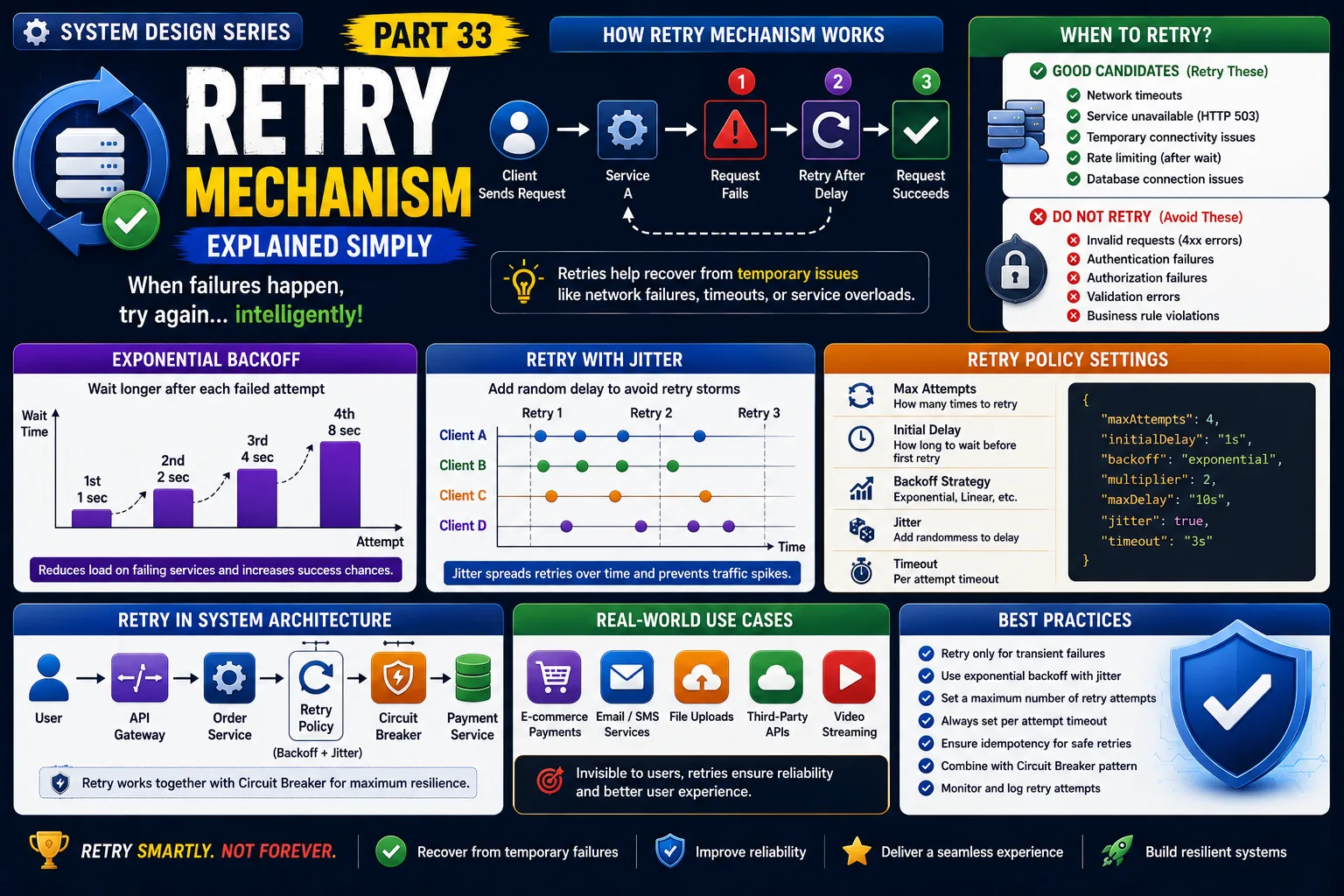
System Design Series — Part 33
Imagine you're ordering food on Swiggy.
You click "Place Order."
The app sends a request to the Payment Service.
Suddenly...
The Payment Service doesn't respond.
Was the payment server completely down?
Not necessarily.
Maybe:
-
There was a temporary network issue.
-
The service was restarting.
-
A database connection timed out.
-
The server was under heavy load for a few seconds.
Should your application immediately show:
"Payment Failed"
Probably not.
Sometimes, simply trying again solves the problem.
This is exactly why modern distributed systems use the Retry Mechanism.
Let's understand how it works.
The Real Problem
Imagine your Order Service calls the Payment Service.
Normally:
Order Service
↓
Payment Service
↓
Success
But sometimes the request fails because of a temporary issue.
Without retries:
One temporary failure becomes a failed transaction.
The customer may abandon the purchase.
The business loses revenue.
Modern systems know that not every failure is permanent.
A Simple Real-World Analogy
Imagine you're calling a friend.
You call once.
No answer.
Do you immediately assume they changed their phone number?
No.
You wait a few seconds.
Then call again.
Usually, the second or third attempt succeeds.
That's exactly how Retry works in software.
What is a Retry Mechanism?
A Retry Mechanism automatically attempts a failed operation again before reporting it as a failure.
Instead of failing immediately,
the application retries the request after a short delay.
If the problem was temporary,
the request succeeds.
The user never notices the failure.
How Retry Works
Step 1
Client sends request.
↓
Step 2
Application calls another service.
↓
Step 3
Request fails.
↓
Step 4
Application waits for a short time.
↓
Step 5
Retry the request.
↓
If successful,
return the response.
Otherwise,
retry again until the maximum retry limit is reached.
Real-World Example
Imagine you're booking a cab on Uber.
Your request reaches the Pricing Service.
The service is temporarily overloaded.
Instead of showing:
"Unable to calculate fare."
Uber retries the request.
Within milliseconds,
the service responds successfully.
The customer never knows a failure occurred.
Another Example
Suppose you're uploading a file to Google Drive.
Your internet disconnects for two seconds.
The upload doesn't immediately fail.
Instead,
Google automatically retries.
The upload continues without requiring user intervention.
This improves the user experience.
Why Do We Need Retries?
Retries help recover from:
✔ Temporary network failures
✔ Timeout errors
✔ Short service outages
✔ Database connection issues
✔ Temporary cloud infrastructure problems
Many failures disappear after a few seconds.
Retries help applications recover automatically.
When Should You Retry?
Retries are useful when failures are temporary.
Examples:
✔ Network timeout
✔ Service unavailable (HTTP 503)
✔ Temporary database connection issue
✔ Rate limiting after waiting
These failures often succeed after another attempt.
When Should You NOT Retry?
Retries are a bad idea for permanent failures.
Examples:
❌ Invalid password
❌ Invalid API request
❌ Authentication failure
❌ Authorization failure
❌ Data validation errors
Retrying these requests only wastes resources.
Retry with Exponential Backoff
One common mistake is retrying immediately.
Instead,
production systems use Exponential Backoff.
Example:
Attempt 1
Wait 1 second.
↓
Attempt 2
Wait 2 seconds.
↓
Attempt 3
Wait 4 seconds.
↓
Attempt 4
Wait 8 seconds.
Each retry waits longer than the previous one.
This prevents overloaded services from receiving another flood of requests.
Retry with Jitter
Imagine one million clients retry at exactly the same moment.
The service receives another traffic spike.
To avoid this,
systems add a small random delay.
This technique is called:
Jitter
It's widely used by AWS, Google Cloud, and Microsoft Azure.
Production Architecture
A typical architecture looks like this:
Users
↓
API Gateway
↓
Order Service
↓
Retry Policy
↓
Circuit Breaker
↓
Payment Service
↓
Database
Notice that Retry often works together with Circuit Breakers.
Retries handle temporary failures.
Circuit Breakers stop repeated failures.
Together, they improve resilience.
Retry vs Circuit Breaker
Developers often confuse these patterns.
Retry
Purpose:
Try again.
Best for:
Temporary failures.
Circuit Breaker
Purpose:
Stop sending requests.
Best for:
Persistent failures.
Modern systems usually implement both.
Real-World Companies
Companies like:
-
Netflix
-
Amazon
-
Uber
-
Microsoft
-
Google
use retry strategies extensively.
Without retries,
temporary network issues could cause millions of unnecessary failures every day.
Advantages
✔ Improves reliability
✔ Recovers from temporary failures
✔ Better user experience
✔ Higher success rate
✔ Reduces manual retries by users
Challenges
Too Many Retries
Unlimited retries can overload already struggling services.
Always define a retry limit.
Wrong Retry Timing
Immediate retries may worsen traffic spikes.
Use exponential backoff.
Duplicate Requests
Imagine retrying:
Place Order
The user could accidentally create two orders.
This is why idempotency is important.
Idempotency
Some operations can be repeated safely.
Example:
GET /products
Retrying is safe.
Some operations require extra care.
Example:
POST /orders
Retrying could create duplicate orders.
Production systems often use:
Idempotency Keys
to prevent duplicate processing.
Common Developer Mistakes
Retrying Every Error
Not every error should be retried.
Understand the failure type.
Infinite Retry Loops
Always configure:
-
Maximum retry attempts
-
Maximum timeout
No Logging
Track:
-
Retry count
-
Failure reasons
-
Success after retry
This helps identify unstable services.
Ignoring Idempotency
Retries should never create duplicate business transactions.
Production-Level Insight
A common misconception is:
"More retries mean better reliability."
Actually,
too many retries can create a Retry Storm.
Thousands of clients repeatedly calling a failing service can make the outage even worse.
That's why production systems combine:
✔ Retry
✔ Exponential Backoff
✔ Jitter
✔ Circuit Breakers
Together, they create resilient architectures.
Interview Tip
A common System Design interview question is:
"How would you handle temporary failures between microservices?"
A strong answer should include:
-
Retry Policy
-
Exponential Backoff
-
Jitter
-
Circuit Breaker
-
Idempotency
-
Timeouts
Interviewers are looking for practical production knowledge—not just definitions.
Key Takeaways
✔ Retry Mechanisms recover from temporary failures
✔ Only retry transient errors
✔ Use Exponential Backoff instead of immediate retries
✔ Add Jitter to avoid synchronized retry spikes
✔ Never retry permanent failures blindly
✔ Combine Retry with Circuit Breakers for resilient systems
✔ Idempotency prevents duplicate operations during retries
One of the biggest lessons in System Design is this:
Failures are normal in distributed systems.
Great systems don't panic—they retry intelligently.
That's why the Retry Mechanism is one of the most important resilience patterns used in modern cloud applications.
This is Part 33 of the System Design Simplified series.
Next Article: Part 34 — Timeout Pattern Explained Simply
If this article helped you understand the Retry Mechanism better, consider sharing it with fellow developers.
#SystemDesign #RetryMechanism #Microservices #SoftwareArchitecture #DistributedSystems #BackendDevelopment #Resilience #CircuitBreaker #CloudComputing #Scalability #SoftwareEngineering #SystemDesignInterview #BackendEngineer #DesignPatterns #TechArchitecture
