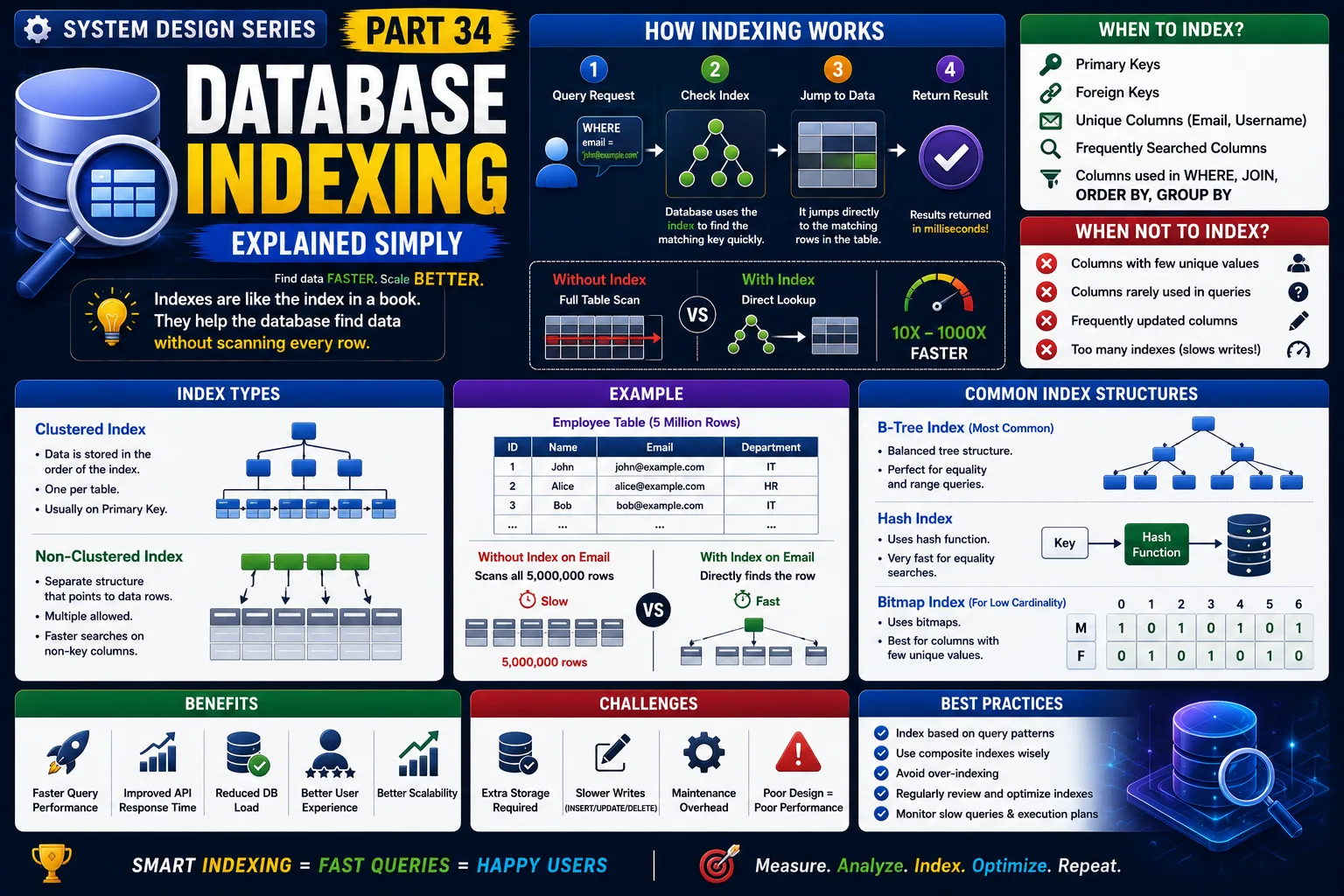
System Design Series — Part 34
Imagine you're using Amazon during the Big Billion Sale.
You search for:
"iPhone 16 Pro"
Within milliseconds, thousands of matching products appear.
Now imagine Amazon had to scan every product in its database before showing the results.
Instead of milliseconds...
It could take minutes.
Imagine the experience for millions of users.
This is exactly why databases use Indexes.
Database Indexing is one of the simplest—and most powerful—techniques for improving application performance.
Let's understand it in the simplest way possible.
The Real Problem
Imagine your database contains:
10 Products.
Finding one product is easy.
Now imagine it contains:
10 Million Products.
Every search now requires checking millions of rows.
As your application grows,
queries become slower.
Users experience:
❌ Slow search results
❌ Delayed dashboards
❌ Slow APIs
❌ High database CPU usage
Without indexing,
every query becomes more expensive as your data grows.
A Simple Real-World Analogy
Imagine you're reading a 1,000-page book.
You want to find the chapter:
"Microservices."
Would you start reading from page 1?
Probably not.
Instead,
you open the Index at the back of the book.
It tells you:
Microservices → Page 742
You jump directly to the correct page.
A database index works exactly the same way.
It helps the database find data without scanning every row.
What is Database Indexing?
A database index is a special data structure that helps the database locate rows much faster.
Instead of searching the entire table,
the database first checks the index,
then jumps directly to the required data.
Think of it as a shortcut to your data.
How Database Indexing Works
Step 1
User searches:
"iPhone"
↓
Step 2
Database checks whether an index exists.
↓
Step 3
The index points directly to matching rows.
↓
Step 4
Database retrieves only the required records.
↓
Results are returned in milliseconds.
Without an index,
the database must examine every row in the table.
Real-World Example
Imagine an Employee table with:
5 million employees.
Query:
Find employee by Email Address.
Without an index:
The database scans all 5 million rows.
With an index on Email:
The database jumps directly to the matching record.
The difference can be milliseconds versus several seconds.
Another Example
Imagine Instagram.
You search for:
@cristiano
Instagram doesn't scan every user account.
Instead,
it uses indexes on searchable fields like usernames.
That's why results appear almost instantly.
Why Do We Need Indexes?
Indexes improve:
✔ Search speed
✔ Query performance
✔ API response time
✔ Database efficiency
✔ User experience
Almost every production application depends on proper indexing.
Production Architecture
A typical request flow looks like this:
User
↓
API
↓
Application Server
↓
SQL Query
↓
Database Index
↓
Matching Records
↓
Response
Notice that the index is used before reading table data.
This reduces unnecessary disk access.
Clustered vs Non-Clustered Index
Clustered Index
The table data is physically stored in index order.
Each table can have only one clustered index.
Typically created on the Primary Key.
Non-Clustered Index
A separate structure that points to table rows.
A table can have multiple non-clustered indexes.
Used for frequently searched columns like:
-
Email
-
Username
-
Order Number
Common Columns to Index
Good candidates include:
✔ Primary Keys
✔ Foreign Keys
✔ Username
✔ Phone Number
✔ Order ID
✔ Product SKU
✔ Frequently searched fields
When Should You Avoid Indexes?
Indexes are powerful,
but they are not free.
Avoid indexing:
-
Columns with very few unique values
-
Rarely queried columns
-
Frequently updated columns without search requirements
Too many indexes can slow down:
-
INSERT
-
UPDATE
-
DELETE
because every index must also be updated.
Real-World Companies
Companies like:
-
Amazon
-
Netflix
-
Uber
-
LinkedIn
-
Facebook
rely heavily on database indexing.
Without indexes,
their databases couldn't efficiently process millions of queries every second.
Advantages
✔ Faster SELECT queries
✔ Lower database load
✔ Improved API performance
✔ Better scalability
✔ Faster sorting and filtering
✔ Better user experience
Challenges
Extra Storage
Indexes consume disk space.
Large databases may contain hundreds of gigabytes of indexes.
Slower Writes
Every INSERT, UPDATE, and DELETE must also update related indexes.
Read performance improves,
but write performance may decrease slightly.
Poor Index Design
Creating indexes on the wrong columns wastes storage and provides little benefit.
Good index design requires understanding query patterns.
Composite Index
Sometimes queries filter on multiple columns.
Example:
WHERE Department = 'IT'
AND City = 'Delhi'
Instead of creating two separate indexes,
a Composite Index on:
(Department, City)
can significantly improve performance.
Common Developer Mistakes
Creating Too Many Indexes
More indexes do not always mean better performance.
Forgetting Foreign Keys
Foreign key columns are frequently used in joins.
They often benefit from indexing.
Ignoring Query Plans
Always analyze query execution plans before creating indexes.
Measure first.
Optimize second.
Not Monitoring Slow Queries
Use database monitoring tools to identify queries that actually need indexing.
Production-Level Insight
A common misconception is:
"Indexes always make databases faster."
Not exactly.
Indexes speed up reads,
but they also make writes slightly more expensive.
Great database engineers don't add indexes everywhere.
They create indexes only where the workload benefits.
Optimization is about balance.
Interview Tip
A common System Design interview question is:
"Why is my SQL query slow, and how would you optimize it?"
A strong answer should mention:
-
Database Indexing
-
Query Execution Plans
-
Composite Indexes
-
Covering Indexes
-
Full Table Scans
-
Selective Columns
Interviewers want to know whether you understand how databases retrieve data—not just how to write SQL.
Key Takeaways
✔ Database indexes help retrieve data much faster
✔ They eliminate expensive full table scans
✔ Indexes improve API response times
✔ Clustered and non-clustered indexes serve different purposes
✔ Composite indexes optimize multi-column searches
✔ Too many indexes can slow down write operations
✔ Always optimize based on real query patterns—not assumptions
One of the biggest lessons in System Design is this:
Fast applications don't always have faster servers.
They have smarter databases.
And one of the smartest optimizations you can make is proper database indexing.
This is Part 34 of the System Design Simplified series.
Next Article: Part 35 — Database Partitioning Explained Simply
If this article helped you understand Database Indexing better, consider sharing it with fellow developers.
#SystemDesign #DatabaseIndexing #SQL #DatabaseOptimization #SoftwareArchitecture #BackendDevelopment #PerformanceTuning #Scalability #CloudComputing #SoftwareEngineering #SystemDesignInterview #BackendEngineer #SQLServer #DatabaseDesign #TechArchitecture
