System Design Series — Part 30
Imagine you log in to your internet banking application.
You enter your username and password only once.
After logging in, you can:
-
Check your account balance
-
Transfer money
-
Download statements
-
Pay bills
You never enter your password again until you log out.
But here's the question:
How does the server remember that you've already logged in?
Does it ask the database every time?
Does it store your password?
No.
It uses something called Session Management.
Before JWT became popular, almost every web application relied on sessions.
Even today, many enterprise applications still do.
Let's understand how Session Management works.
The Real Problem
Imagine you're building an online shopping application.
A user logs in successfully.
Now the user sends hundreds of requests:
-
View Products
-
Add to Cart
-
Checkout
-
View Orders
Should the user send their username and password with every request?
Definitely not.
That would be:
❌ Slow
❌ Insecure
❌ Poor user experience
The server needs a secure way to remember the user.
That's where sessions help.
A Simple Real-World Analogy
Imagine you visit an amusement park.
At the entrance,
you buy a ticket.
The staff verifies your payment and puts a wristband on your hand.
Now, every ride operator simply checks the wristband.
They don't ask for your payment receipt again.
The wristband represents your session.
Your identity was verified once.
After that,
the wristband identifies you.
What is Session Management?
A session is a temporary conversation between a client and a server.
After successful login,
the server creates a Session ID.
The Session ID is sent to the browser, usually as a secure cookie.
On every future request,
the browser automatically sends the Session ID.
The server looks up that Session ID and identifies the user.
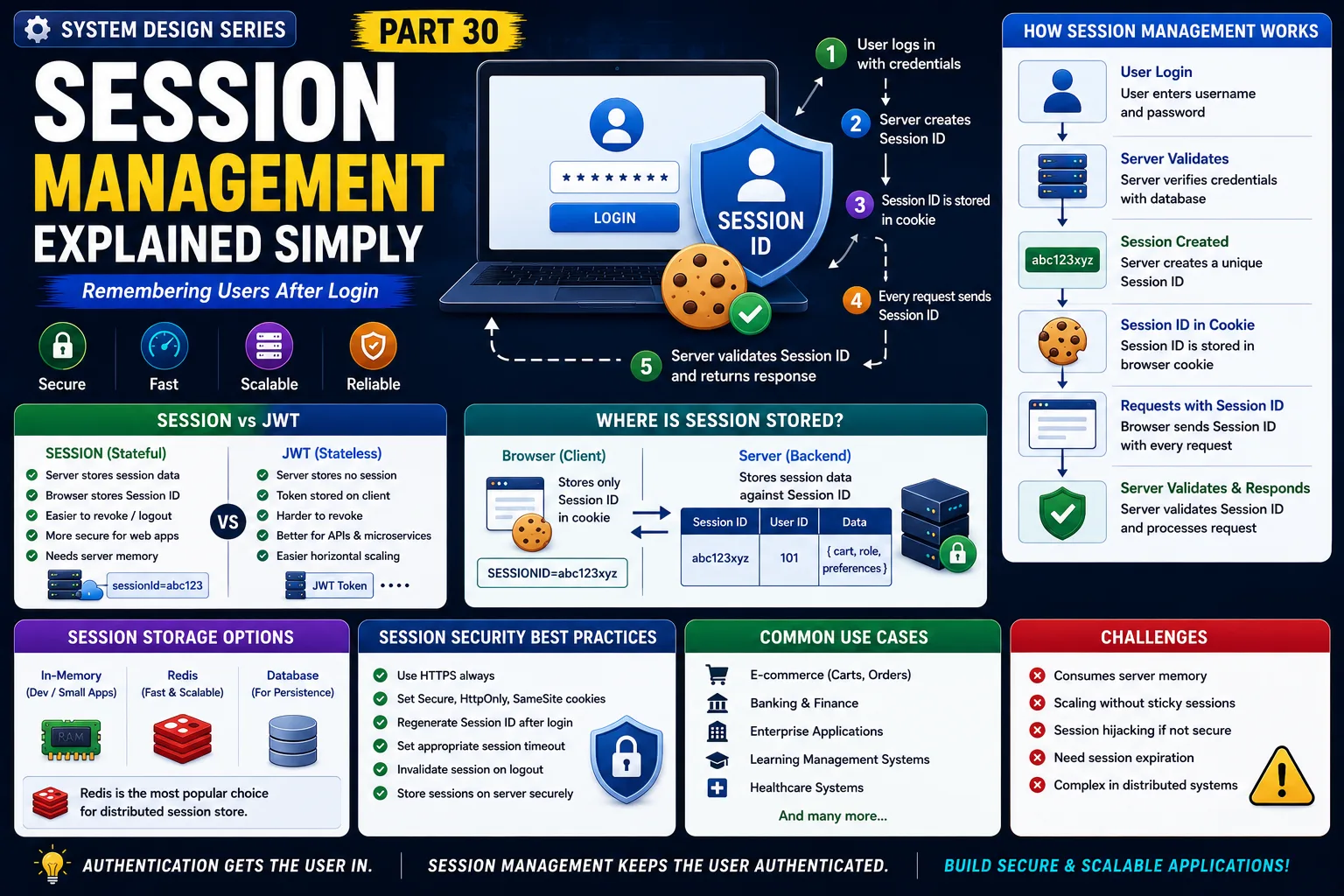
How Session Management Works
Step 1
User logs in.
↓
Step 2
Server validates credentials.
↓
Step 3
Server creates a unique Session ID.
↓
Step 4
Session is stored on the server.
↓
Step 5
Browser stores the Session ID in a cookie.
↓
Step 6
Every future request automatically includes the Session ID.
↓
Step 7
Server verifies the Session ID and processes the request.
The user's password is never sent again.
Where Is the Session Stored?
This is one of the biggest differences between Sessions and JWT.
With sessions:
The server stores user information.
For example:
-
User ID
-
Login Time
-
User Role
-
Shopping Cart
-
Preferences
The browser stores only the Session ID.
The actual session data remains on the server.
Real-World Example
Imagine you're using Amazon.
You log in.
The server creates:
Session ID = XYZ12345
Your browser stores only:
XYZ12345
Every time you:
-
Search products
-
Add to cart
-
Checkout
The browser sends:
Session ID = XYZ12345
The server retrieves your session and knows exactly who you are.
Why Session Management Exists
Without sessions,
the server would need to authenticate users on every request.
Sessions make applications:
✔ Faster
✔ Simpler
✔ More secure for traditional web applications
Production Architecture
A typical session-based architecture looks like this:
User
↓
Load Balancer
↓
Web Server
↓
Session Store (Memory / Redis)
↓
Application
↓
Database
Notice that the server stores the session.
This makes sessions stateful.
Session Storage
Small applications often store sessions:
-
In server memory
Large production systems use:
-
Redis
-
SQL Database
-
Distributed Session Stores
Redis is especially popular because it's extremely fast.
Session Expiration
Sessions shouldn't last forever.
Production systems usually expire sessions after:
-
15 minutes
-
30 minutes
-
1 hour
This reduces security risks if a user leaves their device unattended.
Session vs JWT
Session Authentication
✔ Server stores session data
✔ Browser stores Session ID
✔ Easy to revoke
✔ Good for traditional web applications
JWT Authentication
✔ Server stores no session
✔ Client stores token
✔ Better horizontal scalability
✔ Common in REST APIs and microservices
Neither is universally better.
Choose based on your architecture.
Real-World Companies
Many enterprise applications still use sessions.
Examples include:
-
Banking Portals
-
Government Websites
-
Enterprise ERP Systems
-
Internal Business Applications
Modern SaaS platforms often combine sessions with other authentication methods depending on the use case.
Advantages of Session Management
✔ Simple to implement
✔ Easy logout
✔ Easy session invalidation
✔ Better control over user sessions
✔ Well suited for traditional web applications
Challenges of Session Management
Server Memory Usage
Every logged-in user consumes server resources.
Horizontal Scaling
If sessions are stored on one server,
requests must reach the same server.
Solutions include:
-
Sticky Sessions
-
Distributed Session Stores
-
Redis
Session Hijacking
If attackers steal a Session ID,
they may impersonate the user.
Always use:
-
HTTPS
-
Secure Cookies
-
HttpOnly Cookies
-
SameSite Cookies
Common Developer Mistakes
Storing Sessions Only in Memory
Works for development.
Fails when multiple servers are added.
No Session Timeout
Long-lived sessions increase security risks.
Ignoring Secure Cookies
Always enable:
Secure
HttpOnly
SameSite
These significantly improve security.
Not Regenerating Session IDs
Generate a new Session ID after login to prevent session fixation attacks.
Production-Level Insight
A common misconception is:
"Sessions are outdated because JWT exists."
That's not true.
Many large organizations still prefer session-based authentication for web applications because:
-
Sessions are easy to revoke.
-
They offer centralized control.
-
They simplify logout across devices.
JWT and Sessions solve different problems.
Good architects choose based on scalability, security, and business requirements.
Interview Tip
A common System Design interview question is:
"What's the difference between Session-Based Authentication and JWT Authentication?"
A strong answer should discuss:
-
Stateful vs Stateless
-
Server-side storage
-
Scalability
-
Load balancing
-
Session expiration
-
Redis
-
Security trade-offs
Interviewers want to understand whether you know when to use each approach.
Key Takeaways
✔ Session Management allows servers to remember authenticated users
✔ The browser stores only a Session ID
✔ The server stores session data
✔ Sessions are stateful
✔ Redis is commonly used for distributed session storage
✔ Secure cookies and session expiration improve security
✔ Sessions remain an excellent choice for many enterprise web applications
One of the biggest lessons in System Design is this:
Authentication gets the user in.
Session Management keeps the user authenticated.
Understanding both is essential for building secure and scalable applications.
This is Part 30 of the System Design Simplified series.
Next Article: Part 31 — Cookies Explained Simply
If this article helped you understand Session Management better, consider sharing it with fellow developers.
#SystemDesign #SessionManagement #Authentication #SoftwareArchitecture #BackendDevelopment #WebSecurity #Cookies #Redis #Microservices #SoftwareEngineering #SystemDesignInterview #BackendEngineer #Programming #CloudComputing #TechArchitecture
