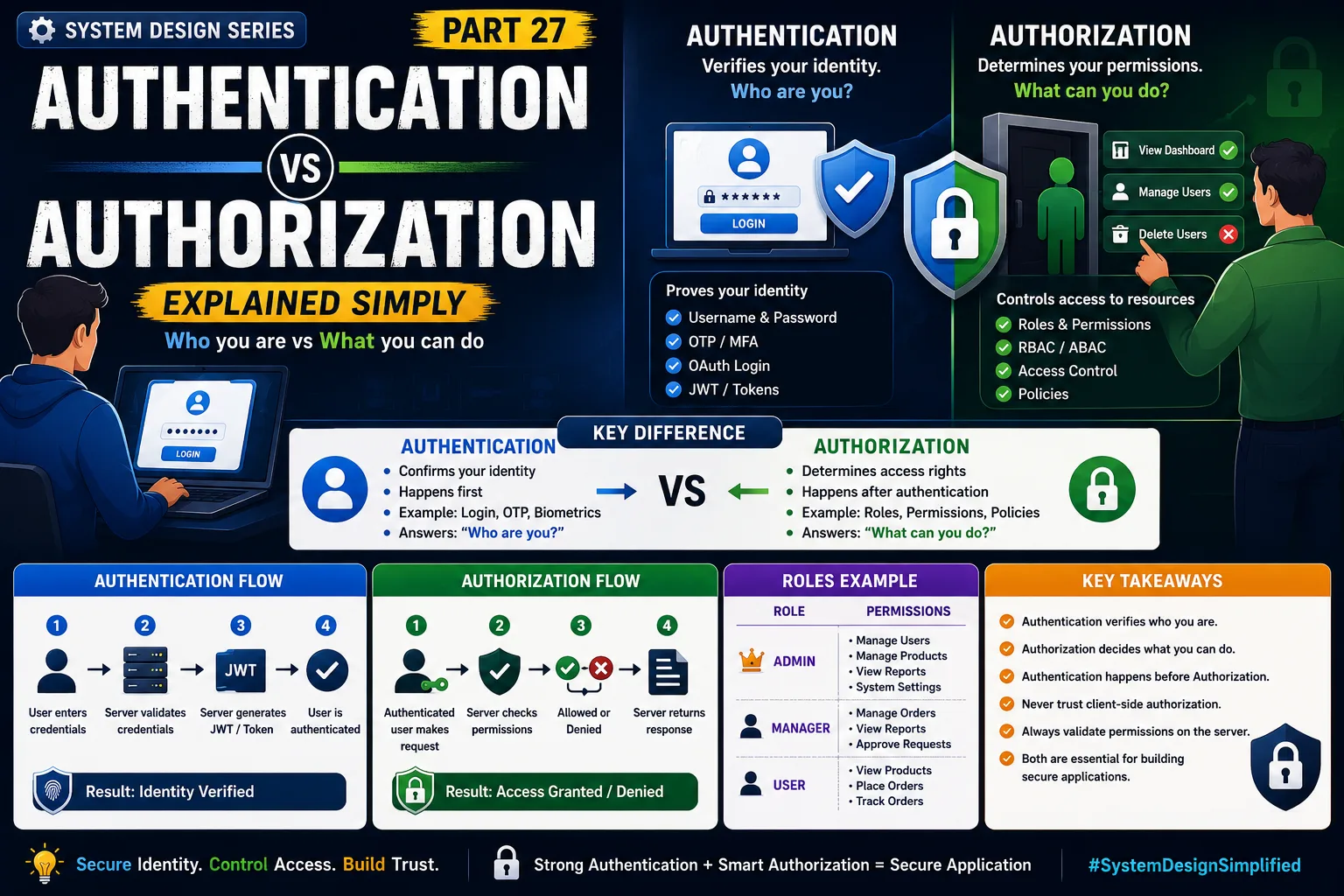
Authentication vs Authorization Explained Simply
System Design Series — Part 27
One of the most common interview questions is:
"What's the difference between Authentication and Authorization?"
Surprisingly, many developers use these terms interchangeably.
But they are not the same thing.
If you're building any modern application—whether it's an e-commerce platform, banking app, or hospital management system—you'll use both.
Understanding the difference is essential for backend development, system design, and software architecture.
Let's break it down with a simple real-world example.
The Real Problem
Imagine you're using an online banking application.
You enter:
-
Username
-
Password
The system checks your credentials.
If they're correct,
you successfully log in.
Now you click:
Transfer Money
Can every logged-in user transfer money?
Not necessarily.
Some users may only be allowed to:
-
View account details
-
Download statements
-
Check balances
Others may have permission to:
-
Transfer funds
-
Manage beneficiaries
-
Approve transactions
This is where Authentication and Authorization come into play.
A Simple Real-World Analogy
Imagine you're entering an office building.
Step 1
The security guard checks your ID card.
If your identity is verified,
you're allowed to enter.
This is:
Authentication
Step 2
Once inside,
can you enter every room?
No.
Some rooms are restricted.
For example:
-
Server Room
-
CEO Cabin
-
Finance Department
Your access depends on your role.
This is:
Authorization
In simple words:
Authentication = Who are you?
Authorization = What are you allowed to do?
What is Authentication?
Authentication is the process of verifying a user's identity.
The application answers:
"Is this person really who they claim to be?"
Common authentication methods include:
-
Username & Password
-
OTP
-
Fingerprint
-
Face Recognition
-
OAuth Login
-
JWT Tokens
-
Multi-Factor Authentication (MFA)
Only after successful authentication does the user gain access to the application.
What is Authorization?
Authorization happens after authentication.
It determines:
"What resources can this authenticated user access?"
Examples:
An Admin can:
✔ Create Users
✔ Delete Users
✔ Manage Products
✔ View Reports
A Customer can:
✔ View Products
✔ Place Orders
✔ Track Orders
The user is authenticated,
but their permissions are different.
Authentication Flow
Step 1
User enters credentials.
↓
Step 2
Server validates credentials.
↓
Step 3
If valid,
the server generates a JWT or Session.
↓
Step 4
User is logged in.
Identity is verified.
Authorization Flow
Step 1
Authenticated user requests:
DELETE /users/10
↓
Step 2
Server checks permissions.
↓
Step 3
If user has Admin role,
request succeeds.
Otherwise,
server returns:
403 Forbidden
Real-World Example: Amazon
Imagine you're shopping on Amazon.
Customers can:
-
Search products
-
Add items to cart
-
Place orders
Administrators can:
-
Add products
-
Update prices
-
Manage inventory
Both users authenticate.
But their permissions are completely different.
Real-World Example: Hospital Management System
A Hospital Management System may have:
Doctor
✔ View patient records
✔ Write prescriptions
Receptionist
✔ Register patients
✔ Book appointments
Pharmacist
✔ Dispense medicines
Administrator
✔ Manage staff
✔ View reports
✔ Configure the system
Everyone logs in.
But everyone sees different features.
That's authorization.
Authentication vs Authorization
Authentication
Purpose:
Verify identity.
Question:
"Who are you?"
Examples:
-
Password
-
OTP
-
Face ID
-
Google Login
Happens:
First.
Authorization
Purpose:
Control access.
Question:
"What can you do?"
Examples:
-
Roles
-
Permissions
-
Policies
-
Access Control Lists (ACL)
Happens:
After authentication.
Production Architecture
A typical authentication flow looks like this:
User
↓
Load Balancer
↓
API Gateway
↓
Authentication Service
↓
JWT Token
↓
Application Services
↓
Authorization Check
↓
Database
Every protected request follows this pattern.
JWT in Authentication
After successful login,
the server often returns a JWT (JSON Web Token).
The client sends this token with every request.
The server verifies the token before processing the request.
JWT proves the user's identity.
It does not automatically determine permissions.
Authorization still needs to be checked.
Role-Based Access Control (RBAC)
One of the most common authorization models is:
Role-Based Access Control (RBAC).
Example:
Admin
↓
Permissions:
Create User
Delete User
Manage Products
Customer
↓
Permissions:
View Products
Place Orders
Track Orders
Instead of assigning permissions to every user,
permissions are assigned to roles.
This simplifies administration.
Real-World Companies
Almost every major platform uses both authentication and authorization.
Examples:
-
Google
-
Microsoft
-
Amazon
-
Netflix
-
GitHub
-
Stripe
Without proper authorization,
even authenticated users could access sensitive data.
Common Developer Mistakes
Confusing Authentication with Authorization
Verifying identity is not the same as granting permissions.
Trusting Client-Side Roles
Never rely on frontend checks alone.
Authorization must always happen on the server.
Missing Authorization Checks
A logged-in user should never automatically have access to every API.
Using Weak Authentication
Always store passwords securely using hashing algorithms like bcrypt or Argon2.
Never store plain-text passwords.
Ignoring Multi-Factor Authentication
For sensitive applications such as banking or healthcare,
MFA significantly improves security.
Production-Level Insight
One misconception is:
"If the user is logged in, they can access everything."
That's dangerous.
In enterprise applications,
every API endpoint should verify:
✔ Who is making the request?
✔ What permissions do they have?
Authentication without authorization creates security risks.
Interview Tip
A common System Design interview question is:
"Explain the difference between Authentication and Authorization with an example."
A strong answer should explain:
-
Identity verification
-
Permission validation
-
JWT
-
RBAC
-
Authentication flow
-
Authorization flow
Interviewers want to know whether you understand how security works in real production systems.
Key Takeaways
✔ Authentication verifies a user's identity
✔ Authorization determines what the user is allowed to access
✔ Authentication always happens before authorization
✔ JWT is commonly used for authentication
✔ RBAC simplifies permission management
✔ Every protected API should validate both identity and permissions
✔ Secure applications require both authentication and authorization
One of the biggest lessons in System Design is this:
Logging in proves who you are.
Permissions decide what you're allowed to do.
Great software protects both identity and access.
This is Part 27 of the System Design Simplified series.
Next Article: Part 28 — JWT Authentication Explained Simply
If this article helped you understand Authentication and Authorization better, consider sharing it with fellow developers.
#SystemDesign #Authentication #Authorization #JWT #RBAC #SoftwareArchitecture #BackendDevelopment #APISecurity #Microservices #SoftwareEngineering #SystemDesignInterview #BackendEngineer #CyberSecurity #Programming #TechArchitecture
