System Design Series — Part 29
Have you ever clicked one of these buttons?
Continue with Google
Sign in with GitHub
Login with Microsoft
You didn't create a new password.
You didn't register again.
Yet, you logged into the application within seconds.
How is that possible?
Did the application get your Google password?
Absolutely not.
This is where OAuth 2.0 comes in.
OAuth is one of the most widely used authorization frameworks in modern applications.
If you've ever built or used:
-
Google Login
-
GitHub Login
-
Facebook Login
-
Microsoft Login
-
LinkedIn Login
then you've already used OAuth.
Let's understand how it works in the simplest way possible.
The Real Problem
Imagine you're building a new project management application.
You want users to log in quickly.
You have two options.
Option 1
Create your own registration system.
Users need to:
-
Create a username
-
Create a password
-
Verify email
-
Remember another password
Many users leave before completing the registration.
Option 2
Allow users to click:
Continue with Google
One click.
Instant login.
Better user experience.
That's why millions of applications use OAuth.
A Simple Real-World Analogy
Imagine you're checking into a hotel.
The receptionist asks for your identity.
Instead of carrying dozens of documents,
you show your government-issued ID card.
The hotel trusts the government to verify your identity.
The hotel never asks for your passport number again.
OAuth works in a similar way.
Instead of verifying users directly,
your application trusts a trusted provider like Google or GitHub.
What is OAuth?
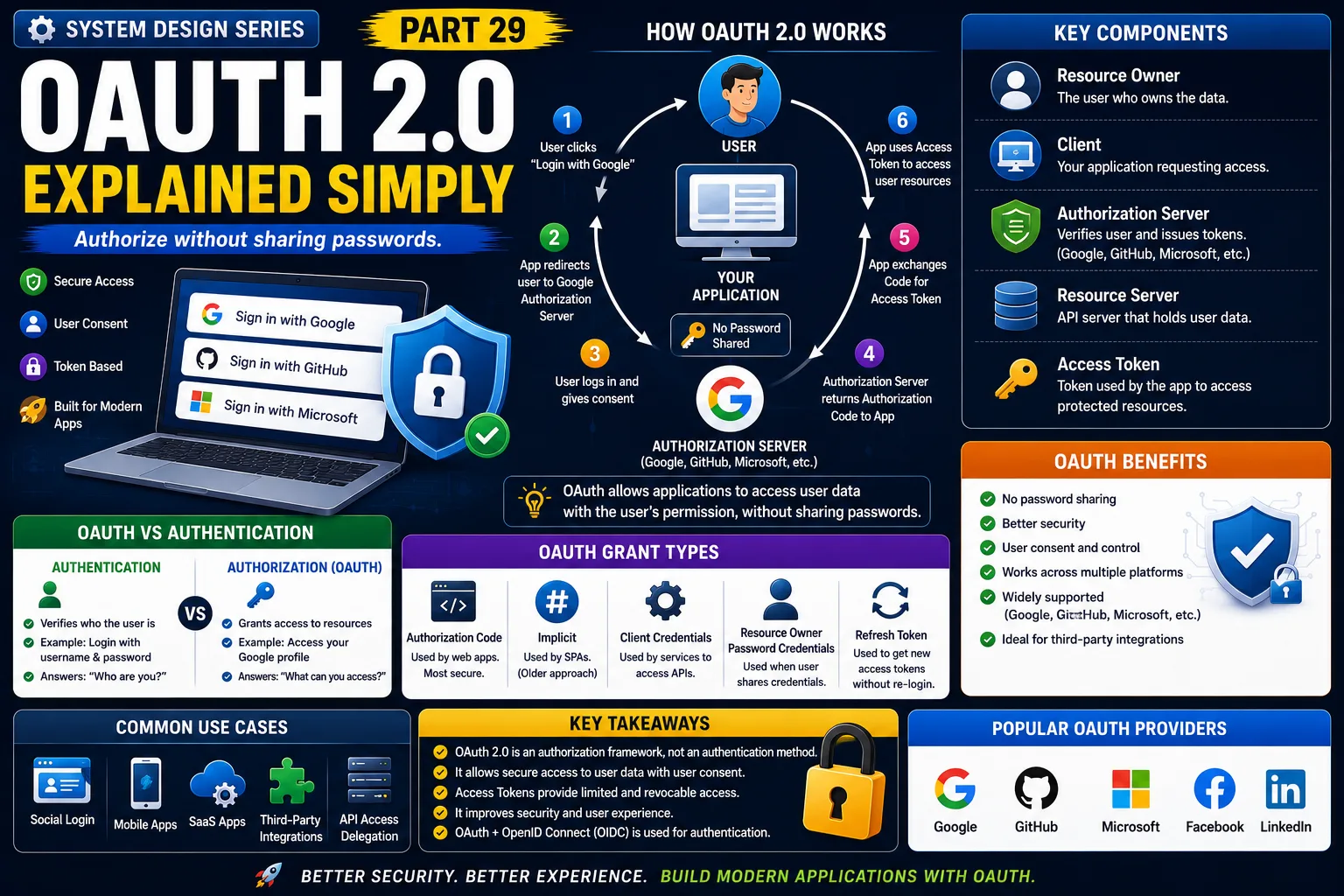
OAuth (Open Authorization) is an authorization framework that allows one application to access limited information from another application without sharing the user's password.
Notice something important.
OAuth is primarily about authorization, not authentication.
However,
many applications use OAuth together with OpenID Connect (OIDC) to authenticate users.
How OAuth Login Works
Imagine you're signing in with Google.
Step 1
User clicks:
Continue with Google
↓
Step 2
Application redirects user to Google.
↓
Step 3
User logs into Google.
↓
Step 4
Google asks:
"Do you allow this application to access your profile?"
↓
Step 5
User clicks:
Allow
↓
Step 6
Google sends an Authorization Code.
↓
Step 7
Application exchanges the code for an Access Token.
↓
Step 8
Application retrieves the user's profile.
↓
User is logged in.
Notice:
Your password is never shared with the application.
Why OAuth Exists
Imagine every application asked for your Google password.
That would be dangerous.
Instead,
Google authenticates you.
Then it gives the application a limited permission token.
The application receives only the permissions you approve.
Real-World Example
Suppose you're using Canva.
You choose:
Continue with Google
Google asks:
"This app wants access to:"
✔ Name
✔ Email Address
You approve.
Canva receives only that information.
It never receives your password.
That's OAuth in action.
Another Example
Imagine connecting Spotify to your Google account.
Spotify may request permission to:
-
View your email
-
View your profile
It cannot suddenly:
❌ Read your Gmail
❌ Delete your Drive files
OAuth limits what an application can access.
Key OAuth Components
Resource Owner
The user.
Client
Your application.
Authorization Server
Google, Microsoft, GitHub, etc.
Resource Server
The API containing user data.
Access Token
A temporary token used to access approved resources.
Access Token
After approval,
OAuth returns an Access Token.
The application uses this token instead of asking for your password.
Access Tokens are:
✔ Temporary
✔ Limited
✔ Revocable
This improves security.
OAuth in Production
A typical architecture looks like this:
User
↓
Application
↓
Google Authorization Server
↓
Access Token
↓
Google APIs
↓
User Profile
Your application never handles the user's password.
That's one of OAuth's biggest advantages.
Why Companies Use OAuth
Large companies use OAuth because it provides:
✔ Better user experience
✔ Faster registration
✔ Improved security
✔ Trusted authentication providers
✔ Reduced password management
This is why you'll see social login on thousands of websites.
OAuth vs JWT
Many developers confuse these technologies.
OAuth
Used for:
Granting permissions between applications.
JWT
Used for:
Carrying user identity and claims.
Interestingly,
many OAuth providers return JWT-based ID Tokens.
The two technologies often work together.
They are not competitors.
OAuth vs Authentication
A common misconception is:
"OAuth is authentication."
Not exactly.
OAuth answers:
"What is this application allowed to access?"
Authentication answers:
"Who is the user?"
For user login,
OAuth is commonly combined with OpenID Connect (OIDC).
Advantages of OAuth
✔ No password sharing
✔ Better security
✔ Faster user onboarding
✔ Trusted identity providers
✔ Fine-grained permissions
✔ Easy integration with Google, GitHub, Microsoft, and others
Challenges of OAuth
Token Expiration
Access Tokens should expire after a short period.
Permission Management
Only request permissions your application actually needs.
Secure Token Storage
Access Tokens should be stored securely.
Complexity
OAuth involves multiple redirects and token exchanges.
Fortunately,
most modern frameworks handle this automatically.
Common Developer Mistakes
Confusing OAuth with Authentication
OAuth is primarily an authorization framework.
Requesting Too Many Permissions
Users may refuse unnecessary access requests.
Follow the principle of least privilege.
Storing Tokens Insecurely
Protect Access Tokens just like sensitive credentials.
Ignoring Token Expiration
Always handle expired tokens gracefully.
Production-Level Insight
A common misconception is:
"OAuth replaces JWT."
It doesn't.
Many production systems use:
OAuth
for obtaining permission.
JWT
for carrying identity information.
They complement each other.
Understanding how they work together is essential for backend developers.
Interview Tip
A common System Design interview question is:
"Explain the difference between OAuth and JWT."
A strong answer should mention:
-
OAuth is an authorization framework.
-
JWT is a token format.
-
OAuth grants access.
-
JWT carries identity and claims.
-
OAuth providers often issue JWT tokens.
Interviewers are testing whether you understand the relationship—not whether you can memorize definitions.
Key Takeaways
✔ OAuth allows applications to access user data without sharing passwords.
✔ Users grant permission before data is shared.
✔ Access Tokens provide temporary, limited access.
✔ OAuth is primarily an authorization framework.
✔ OAuth is commonly used with OpenID Connect for user authentication.
✔ Google, GitHub, Microsoft, and LinkedIn all support OAuth.
✔ OAuth and JWT are complementary technologies used together in modern applications.
One of the biggest lessons in System Design is this:
Users should never have to share their passwords with every application they use.
OAuth makes secure, permission-based access possible—and that's why it has become the industry standard for social login and third-party integrations.
This is Part 29 of the System Design Simplified series.
Next Article: Part 30 — API Rate Limiting Explained Simply
If this article helped you understand OAuth better, consider sharing it with fellow developers.
#SystemDesign #OAuth #OAuth2 #Authentication #Authorization #JWT #SoftwareArchitecture #BackendDevelopment #APISecurity #Microservices #CloudComputing #SoftwareEngineering #SystemDesignInterview #BackendEngineer #TechArchitecture
