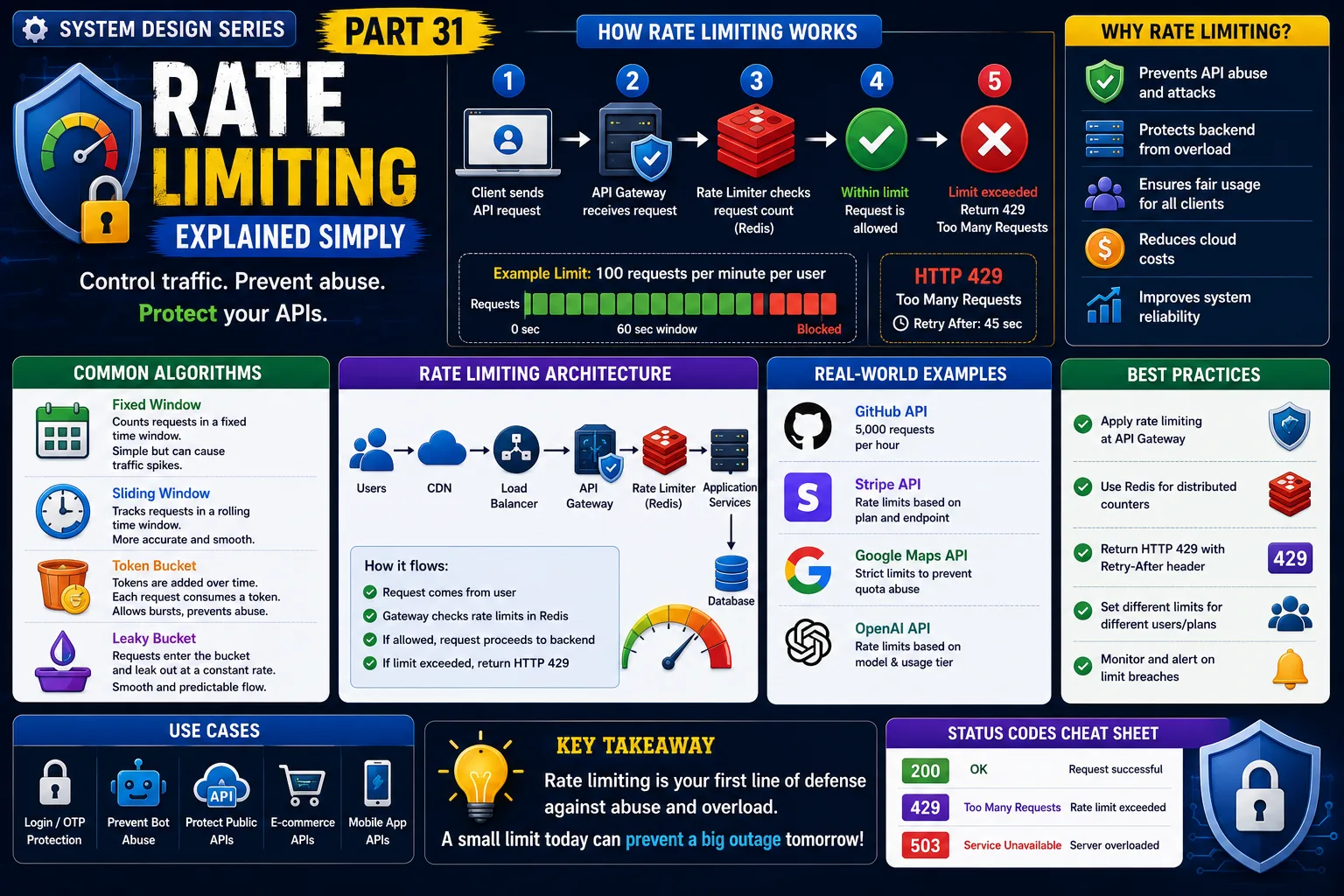
System Design Series — Part 31
Imagine you've built a successful e-commerce application.
Everything works perfectly.
One day, your API suddenly receives 2 million requests in just a few minutes.
Some requests come from real users.
Others come from bots.
Some are accidental.
Some are malicious.
Within minutes:
-
APIs become slow.
-
Servers run out of resources.
-
Databases become overloaded.
-
Genuine users can't access your application.
How do companies like Amazon, Stripe, GitHub, and OpenAI protect their APIs from this?
The answer is Rate Limiting.
Let's understand it in the simplest way possible.
The Real Problem
Imagine you're exposing this API:
POST /login
Without any restrictions,
an attacker can send:
-
10 requests
-
1,000 requests
-
100,000 requests
every second.
This can lead to:
❌ Server overload
❌ Brute-force password attacks
❌ API abuse
❌ Higher cloud costs
❌ Poor user experience
Every production system needs a way to control traffic.
A Simple Real-World Analogy
Imagine entering a movie theater.
The gate allows people to enter one by one.
If 5,000 people rush through the entrance at the same time,
chaos follows.
Instead,
security controls how many people enter each minute.
Everyone still gets in,
just not all at once.
That's exactly what Rate Limiting does.
It controls how many requests a user can make within a given period.
What is Rate Limiting?
Rate Limiting is a technique that restricts the number of requests a client can make within a specific time window.
For example:
-
100 requests per minute
-
1,000 requests per hour
-
10 login attempts every 5 minutes
If the limit is exceeded,
the server rejects additional requests.
Most APIs respond with:
HTTP 429 — Too Many Requests
How Rate Limiting Works
Step 1
User sends an API request.
↓
Step 2
API Gateway checks the request.
↓
Step 3
Rate Limiter counts previous requests.
↓
Step 4
If the limit isn't reached,
the request is processed.
↓
Step 5
If the limit is exceeded,
the API returns:
429 Too Many Requests
The server remains protected.
Real-World Example
Imagine GitHub allows:
5,000 API requests per hour.
If your application sends:
4,999 requests,
everything works.
Request number 5,001?
GitHub responds:
429 Too Many Requests
After the time window resets,
you can continue making requests.
Another Example
Consider an OTP API.
Without Rate Limiting,
someone could request thousands of OTPs every minute.
Production systems usually enforce rules such as:
-
Maximum 3 OTP requests in 10 minutes
-
Maximum 5 login attempts before temporary lockout
This protects both users and infrastructure.
Why Do We Need Rate Limiting?
Rate Limiting protects applications from:
✔ API abuse
✔ Brute-force attacks
✔ Denial-of-Service attempts
✔ Resource exhaustion
✔ Unexpected traffic spikes
It also ensures fair usage by preventing one client from consuming all available resources.
Production Architecture
A typical production flow looks like this:
Users
↓
CDN
↓
Load Balancer
↓
API Gateway
↓
Rate Limiter (Redis)
↓
Application Services
↓
Database
Notice that Rate Limiting is often implemented before requests reach the application servers.
This prevents unnecessary processing.
Common Rate Limiting Algorithms
Fixed Window
Example:
100 requests per minute.
Simple to implement,
but traffic spikes can occur when the time window resets.
Sliding Window
Tracks requests continuously.
Provides smoother traffic control.
Widely used in production systems.
Token Bucket
Each user receives a bucket containing tokens.
Every request consumes one token.
Tokens refill gradually over time.
This allows occasional traffic bursts while preventing abuse.
Leaky Bucket
Imagine water dripping from a bucket at a constant rate.
Incoming requests enter the bucket.
Requests leave at a controlled speed.
This keeps traffic smooth and predictable.
Why Redis Is Commonly Used
Rate limiting requires fast counters.
Redis is ideal because it provides:
✔ Extremely fast reads and writes
✔ Automatic expiration (TTL)
✔ Atomic operations
✔ High scalability
Many API gateways use Redis to store request counts.
Real-World Companies
Almost every large platform uses Rate Limiting.
Examples include:
-
GitHub API
-
Stripe API
-
Google Maps API
-
OpenAI API
-
X (Twitter) API
-
AWS APIs
Without Rate Limiting,
public APIs would be easy targets for abuse.
Advantages of Rate Limiting
✔ Protects backend services
✔ Prevents abuse
✔ Improves system stability
✔ Reduces cloud costs
✔ Ensures fair usage
✔ Improves API reliability
Challenges
Choosing the Right Limits
Limits that are too strict frustrate users.
Limits that are too relaxed reduce protection.
Finding the right balance is important.
Distributed Systems
When multiple API servers exist,
request counts must be shared.
This is why distributed stores like Redis are commonly used.
Different Users Need Different Limits
For example:
Free Users:
100 requests per hour
Premium Users:
10,000 requests per hour
Production systems often support multiple rate limit policies.
Common Developer Mistakes
Applying Rate Limiting Too Late
It should happen at the API Gateway whenever possible.
Using In-Memory Counters
These fail when requests are distributed across multiple servers.
Use Redis or another distributed cache instead.
Returning Generic Errors
Always return:
HTTP 429
along with information about when the client can retry.
Ignoring Monitoring
Track:
-
Rejected requests
-
Traffic spikes
-
Most active clients
-
Abuse patterns
These metrics help improve system reliability.
Production-Level Insight
A common misconception is:
"Rate Limiting is only for security."
Not true.
It also protects application performance.
Even legitimate traffic can overwhelm a system during flash sales, product launches, or viral events.
Rate Limiting keeps applications stable under both expected and unexpected loads.
Interview Tip
A common System Design interview question is:
"How would you protect an API from excessive traffic?"
A strong answer should mention:
-
API Gateway
-
Rate Limiting
-
Redis
-
Token Bucket
-
Sliding Window
-
HTTP 429
-
Monitoring
-
Distributed counters
Interviewers want to understand how you would build resilient, production-ready APIs.
Key Takeaways
✔ Rate Limiting controls how many requests a client can make
✔ It protects APIs from abuse and overload
✔ HTTP 429 indicates the request limit has been exceeded
✔ Redis is commonly used to store request counters
✔ Token Bucket and Sliding Window are popular production algorithms
✔ Different users can have different request limits
✔ Rate Limiting is essential for scalable and secure APIs
One of the biggest lessons in System Design is this:
A scalable API isn't just fast.
It also knows when to say "not right now."
That's exactly what Rate Limiting helps your system achieve.
This is Part 31 of the System Design Simplified series.
Next Article: Part 32 — API Throttling Explained Simply
If this article helped you understand Rate Limiting better, consider sharing it with fellow developers.
#SystemDesign #RateLimiting #BackendDevelopment #SoftwareArchitecture #APIDesign #Redis #DistributedSystems #Scalability #CloudComputing #SoftwareEngineering #SystemDesignInterview #BackendEngineer #Microservices #WebSecurity #TechArchitecture
